本系列主要分享Nvidia官网开发文档
分区描述信息
NVIDIA® Jetson™ Linux支持将大容量存储介质格式化为多个分区,用于存储设备操作系统镜像、引导加载程序镜像、设备固件及启动画面等数据。部分Jetson平台具有相似特性,例如采用相同的分区配置。本文将这些平台按共性分组,并为每个组别提供相关信息。支持的平台按以下方式分类:
| Group | Includes platforms |
|---|---|
| NVIDIA®Jetson AGX Orin™ series | Jetson AGX Orin 32GB (P3701-0000, for development only)Jetson AGX Orin 32GB (P3701-0004)Jetson AGX Orin 64GB (P3701-0005)Jetson AGX Orin Industrial (P3701-0008) |
| NVIDIA® Jetson Orin™ NX series | Jetson Orin NX 16GB (P3767-0000)Jetson Orin NX 16GB (P3767-0001) |
| NVIDIA® Jetson Orin™ Nano series | Jetson Orin Nano 8GB (P3767-0003)Jetson Orin Nano 4GB (P3767-0004)Jetson Orin Nano 8GB (P3767-0005, for development only) |
分区配置文件
分区配置文件用于描述平台上的大容量存储设备及其分区。
下表列出了Jetson Linux支持的所有分区配置定义。其中"文件"列指明了定义该配置的分区配置文件名,"设备"列则标示出配置定义在该文件中对应的
| Platform & Configuration | Boot Partition Device | User Partition Device | File |
|---|---|---|---|
| Jetson AGX Orin Developer-Kit | QSPI_NOR | sdmmc_user on 32GB eMMC | flash_t234_qspi_sdmmc.xml |
| Jetson Orin Nano Developer-Kit | QSPI-NOR | SD card/USB/NVMe drive | flash_t234_qspi_sd.xml |
| Commercial Modules:Jetson AGX Orin 32GB (P3701-0004)Jetson AGX Orin 64GB (P3701-0005)Jetson AGX Orin Industrial (P3701-0008) | QSPI_NOR | sdmmc_user on eMMC | flash_t234_qspi_sdmmc.xml |
| Commercial Modules:Jetson Orin 16GB (P3767-0000)Jetson Orin 8GB (P3767-0001)Jetson Orin 8GB (P3767-0003)Jetson Orin 4GB (P3767-0004) | QSPI_NOR | USB/NVMe drive | flash_t234_qspi_sd.xml |
每个配置文件的名称通常包含其处理器型号(如t234或t194)、分区烧写到的存储器类型(sd代表SD卡,spi代表SPI闪存,emmc代表eMMC),部分情况下还会包含模块料号(例如p3668)。
在烧写过程中,flash.sh脚本会执行以下操作:
- 读取分区配置文件
.xml - 将关键字转换为
.conf文件或命令行选项中指定的具体数值 - 将转换后的数据保存至bootloader/flash.xml
随后,bootloader/tegraflash.py会读取bootloader/flash.xml文件,并根据其中的配置对指定设备进行烧写。
深入分析
以Jetson AGX Orin 64GB (P3701-0005)为例
如上表所示,对应的Boot分区设备是QSPI-NORFLASH,用户分区设备是EMMC,对应的分区配置文件为flash_t234_qspi_sdmmc.xml。解压官方Jetson_Linux_R36.4.4_aarch64.tbz2包,找到flash_t234_qspi_sdmmc.xml如下:
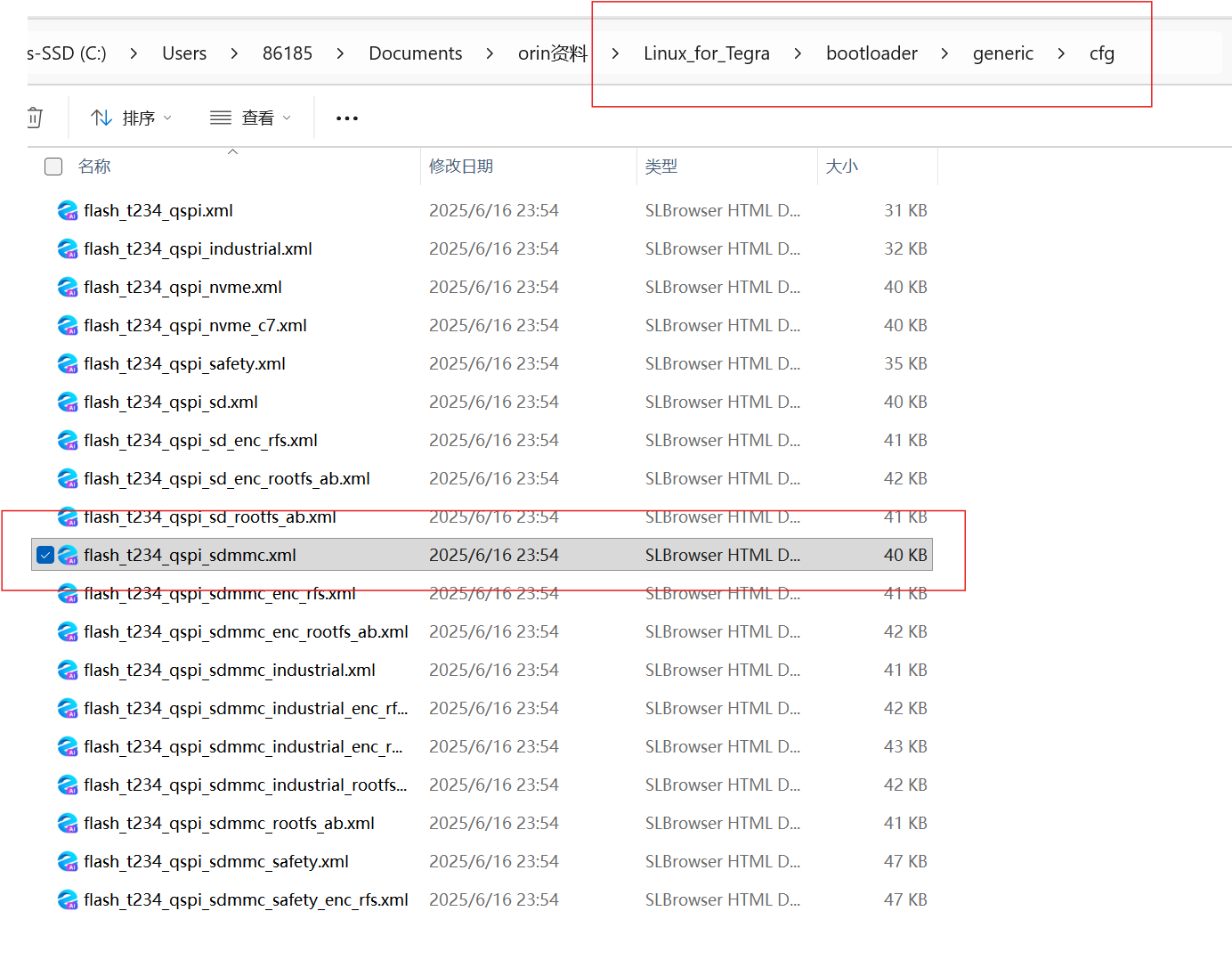
更多详细信息请参阅下文《转译关键字列表》。
分区配置文件
每个分区配置文件为特定Jetson设备的特定配置定义一种或多种分区布局。该文件由以下XML元素构成:
- 标准XML声明
- 一个或多个<partition_layout>元素,每个元素定义一种分区布局
- 在每个<partition_layout>元素中,包含对应每种存储设备(如不同类型的闪存)的
元素 - 在每个
元素中,包含该设备分区布局内每个分区对应的 元素 - 在每个
元素中,包含一组指定分区各项属性的子元素
partition_layout元素
分区layout元素语法如下
<partition_layout version="01.00.0000">
    <!-- Device elements go here. -->
</partition>
device元素
分区配置文件中为每个子设备(例如eMMC的引导分区和用户数据硬件分区)包含一个device元素。即使设备未划分为子设备,该元素也必须存在。
<device>元素的语法结构如下
<device type="<device type>" instance="<instance>">
    <!-- Partition elements go here. -->
</device>
device元素标签属性
下表描述了<device>标签的属性及其有效取值。
| Device attributes | Values | Description |
|---|---|---|
| device type | sdmmc_boot; sdmmc_user SPI; nvme |
Required. Specifies the type of device. eMMC boot0 and boot1 hardware partitions are treated as a single sdmmc_boot entry. |
| instance | 0-3 | Required. Specifies the device instance: 0 for SPI or NVMe, or 3 (typically) for eMMC. |
partition元素
partition元素语法结构如下:
<partition name="<name>" type="<type>" oem_sign="true ">
    <!-- partition properties go here -->
</partition>
partition元素标签属性
| Device attributes | Values | |
|---|---|---|
| name | 参见上文分区配置文件 | Required. 指定分区的名称。该名称最多可包含36个字符。分区共分为三类:必需分区、可选分区和用户自定义分区。所有必需分区和可选分区的名称必须与特定的分区类型关联,而所有用户自定义分区的名称必须与"data"分区类型关联。 |
| type | 参见上文分区配置文件 | Required. 指定分区的类型。某些分区类型仅在与特定分区名称关联时才有效。 |
| oem_sign | True, False, or unspecified. |
Jetson Orin series only: 若设为True,将在二进制文件后附加通用签名头并执行OEM签名。若设为False,则附加空值签名头并执行空值签名。 |
partition子元素
以下标签用于指定 <partition>元素的属性:
| 标签 | 取值 | 说明 |
|---|---|---|
<allocation_policy> |
sequential | 指定分配策略类型。顺序分区从前一分区结束位置开始分配。 |
<filesystem_type> |
basic | 文件系统类型为basic时表示"原始"分区(旧版"ext2"文件系统已弃用)。 |
<size> |
<分区大小> |
必需。以字节为单位指定分区大小,可为十进制或最多16位的十六进制数。 分区大小需大于等于待写入文件大小,更大的分区允许后续扩展文件而无需修改配置文件。 若分区大小小于擦除块大小,将自动对齐至擦除块边界。 设备末尾的次级GPT分区大小必须固定为0xffffffffffffffff,TegraFlash会自动计算该分区大小,前一分区将扩展填充至次级GPT前的所有空闲空间。 |
<file_system_attribute> |
0 | 未实现。 |
<allocation_attribute> |
0x008或0x808 | 必须为0x008或0x808。 紧邻次级GPT的前一分区必须设为0x808。 |
<percent_reserved> |
0 | 保留供未来使用。 |
<filename> |
<文件名>或空 |
指定写入分区的文件名。若为空则不向分区写入数据。 |
转译关键字列表
下表列出了可作为<partition>子元素文本内容使用的关键字。当分区配置文件处理器遇到这些关键字时,会自动将其替换为表中所示或描述的值。
| Keyword | Default translated value in flash.xml |
|---|---|
| MB1FILE | mb1_t234_prod.bin |
| SPEFILE | spe_t234.bin |
| TEGRABOOT | nvtboot_t234.bin |
| MTSPREBOOT | preboot_c10_prod_cr.bin |
| APPSIZE | 30064771072 |
| APPFILE | system.img |
| MTS_MCE | mce_c10_prod_cr.bin |
| MTSPROPER | mts_c10_prod_cr.bin |
| TBCFILE | uefi_jetson.bin |
| TBCDTB-FILE | Appropriate bootloader DTB file name |
| TOSFILE | tos_t234.img |
| EKSFILE | eks.img |
| BPFFILE | bpmp_t234.bin |
| BPFDTB-FILE | Appropriate BPMP DTB file name |
| CAMERAFW | camera-rtcpu-rce.bin |
| WBOBOOT | warmboot_t234_prod.bin |
| LNXSIZE | 67108864 |
| LNXFILE | boot.img |
| DTB_FILE | Appropriate kernel DTB file name |
| RECFILE | Name of appropriate recovery kernel image |
| RECDTB-FILE | Name of appropriate recovery kernel dtb file |
| BOOTCTRL-FILE | kernel_bootctrl.bin |
外部存储设备分区配置
创建用于烧录至外部存储设备的分区配置文件时,请以默认SD卡分区表为模板(例如从分区配置文件表中选取Jetson AGX Orin开发模块的sdmmc_user分区)。将设备类型更改为nvme,实例编号设为零,如下例所示。外部存储设备的分区配置文件必须至少包含三个分区:主引导记录(master_boot_record)、主GPT分区表(primary_gpt)和次GPT分区表(secondary_gpt)。
对于SCSI设备(如SCSI闪存驱动器和硬盘驱动器)与NVMe设备(例如NVMe固态硬盘),设备类型均设置为nvme。同时需要更新num_sectors参数以准确指定外部设备的可用存储总量。例如,若NVMe设备的可用容量为1024209543168字节,则需将num_sectors修改为1024209543168/512 = 2000409264个扇区。
<partition_layout version="01.00.0000">
  <device type="nvme" instance="0" sector_size="512" num_sectors="61071360">
    <partition name="master_boot_record" type="protective_master_boot_record">
      <allocation_policy> sequential </allocation_policy>
      <filesystem_type> basic </filesystem_type>
      <size> 512 </size>
      <file_system_attribute> 0 </file_system_attribute>
      <allocation_attribute> 8 </allocation_attribute>
      <percent_reserved> 0 </percent_reserved>
      <description> **Required.** Contains protective MBR. </description>
    </partition>
    <partition name="primary_gpt" type="primary_gpt">
      <allocation_policy> sequential </allocation_policy>
      <filesystem_type> basic </filesystem_type>
      <size> PPTSIZE </size>
      <file_system_attribute> 0 </file_system_attribute>
      <allocation_attribute> 8 </allocation_attribute>
      <percent_reserved> 0 </percent_reserved>
      <description> **Required.** Contains primary GPT of the `sdmmc_user` device. All
        partitions defined after this entry are configured in the kernel, and are
        accessible by standard partition tools such as gdisk and parted. </description>
    </partition>
    <partition name="secondary_gpt" type="secondary_gpt">
      <allocation_policy> sequential </allocation_policy>
      <filesystem_type> basic </filesystem_type>
      <size> 0xFFFFFFFFFFFFFFFF </size>
      <file_system_attribute> 0 </file_system_attribute>
      <allocation_attribute> 8 </allocation_attribute>
      <percent_reserved> 0 </percent_reserved>
      <description> **Required.** Contains secondary GPT of the `sdmmc_user`
        device. </description>
    </partition>
  </device>
</partition_layout>
Jetson AGX Orin 64GB (P3701-0005)实例分析
以Jetson AGX Orin 64GB (P3701-0005)为例,分区信息如下:
`
<!-- Nvidia Tegra Partition Layout Version 1.0.0 -->

<partition_layout version="01.00.0000">
    <device type="spi" instance="0" sector_size="512" num_sectors="131072" >
#instance 0 表示是SPI Norflash设备 ,大小为512 * 131072 = 64MB
        <partition name="BCT" type="boot_config_table">
            <allocation_policy> sequential </allocation_policy>
            <filesystem_type> basic </filesystem_type>
            <size> 1048576 </size>
            <file_system_attribute> 0 </file_system_attribute>
            <allocation_attribute> 8 </allocation_attribute>
            <percent_reserved> 0 </percent_reserved>
        </partition>
-
分区名称: BCT
-
分区类型: boot_config_table
-
存储位置: QSPI Flash(第一个分区)
-
分区大小: 1048576 字节(1 MB)
-
对齐边界: 未指定(通常是 65536 字节)
-
需要 OEM 签名: 是(根据 l4t_bup_gen.func)
-
固件文件名: 无(由工具动态生成)
BCT 是 Boot Configuration Table,由 BootROM 读取,包含:
- 分区表信息:定义 QSPI Flash 的分区布局
- 启动链配置:指定 A/B 启动链的位置和顺序
- 基本硬件配置:初步的硬件初始化参数
- BootROM 配置:BootROM 所需的配置信息
        <partition name="A_mb1" type="mb1_bootloader">
            <allocation_policy> sequential </allocation_policy>
            <filesystem_type> basic </filesystem_type>
            <size> 524288 </size>
            <file_system_attribute> 0 </file_system_attribute>
            <allocation_attribute> 8 </allocation_attribute>
            <percent_reserved> 0 </percent_reserved>
            <filename> MB1FILE </filename>
            <align_boundary> 262144 </align_boundary>
        </partition>
-
分区名称: A_mb1
-
分区类型: mb1_bootloader
-
存储位置: QSPI Flash(A 启动链的第一个固件分区)
-
分区大小: 524288 字节(512 KB)
-
对齐边界: 262144 字节(256 KB)
-
需要 OEM 签名: 是
p3701.conf.commonLine 181
MB1FILE="bootloader/mb1_t234_prod.bin";
-
固件文件名: mb1_t234_prod.bin
-
文件路径: bootloader/mb1_t234_prod.bin
-
配置变量: MB1FILE
MB1 是第一阶段的启动加载器,被 BootROM 加载后负责:
- 初始化关键硬件:时钟、PMIC、基本电源管理
- 初始化内存控制器:配置 DDR 内存
- 加载 MB1_BCT:读取 MB1 专用的配置表
- 加载并启动 MB2:准备下一阶段的启动
- 安全验证:验证后续启动阶段的签名
        <partition name="A_psc_bl1" type="psc_bl1">
            <allocation_policy> sequential </allocation_policy>
            <filesystem_type> basic </filesystem_type>
            <size> 262144 </size>
            <file_system_attribute> 0 </file_system_attribute>
            <allocation_attribute> 8 </allocation_attribute>
            <percent_reserved> 0 </percent_reserved>
            <filename> PSCBL1FILE </filename>
            <align_boundary> 65536 </align_boundary>
        </partition>
-
分区名称: A_psc_bl1
-
分区类型: psc_bl1 (PSC Bootloader 1)
-
存储位置: QSPI Flash
-
分区大小: 262144 字节(256 KB)
-
对齐边界: 65536 字节(64 KB)
-
需要 OEM 签名: 是
p3701.conf.commonLine 176
PSCBL1FILE="bootloader/psc_bl1_t234_prod.bin";
-
固件文件名: psc_bl1_t234_prod.bin
-
文件路径: bootloader/psc_bl1_t234_prod.bin
-
配置变量: PSCBL1FILE
PSC BL1 是 Platform Security Controller 的第一阶段启动加载器,负责:
- 平台安全初始化:初始化安全子系统
- 安全启动验证:参与安全启动链验证
- 安全密钥管理:管理和保护安全密钥
- 安全策略执行:执行平台安全策略
- 与 MB1 协同工作:在启动早期建立安全环境
与 PSC FW 的区别:
-
A_psc_bl1:PSC 的第一阶段启动加载器
-
A_psc-fw:PSC 的固件(运行时使用)
 <partition name="A_MB1_BCT" type="mb1_boot_config_table">
            <allocation_policy> sequential </allocation_policy>
            <filesystem_type> basic </filesystem_type>
            <size> 131072 </size>
            <file_system_attribute> 0 </file_system_attribute>
            <allocation_attribute> 8 </allocation_attribute>
            <percent_reserved> 0 </percent_reserved>
            <align_boundary> 65536 </align_boundary>
        </partition>
-
分区名称: A_MB1_BCT
-
分区类型: mb1_boot_config_table
-
存储位置: QSPI Flash
-
分区大小: 131072 字节(128 KB)
-
对齐边界: 65536 字节(64 KB)
-
需要 OEM 签名: 是
-
固件文件名: 无(由工具动态生成)
MB1_BCT 是 MB1 专用的配置表,包含:
- 内存配置:DDR 内存的详细配置参数
- 时钟配置:系统时钟和频率设置
- 电源管理配置:PMIC 和电源域配置
- 板级配置:板子特定的硬件配置(引脚复用、GPIO 等)
- 启动参数:后续启动阶段所需的参数
- 安全配置:安全相关的配置信息
与 BCT 的区别:
| 特性 | BCT | MB1_BCT |
|---|---|---|
| 读取者 | BootROM | MB1 |
| 主要用途 | 定位分区和启动链 | MB1 运行时配置 |
| 配置内容 | 分区表、基本硬件配置 | 详细硬件配置、内存配置 |
| 大小 | 1 MB | 128 KB |
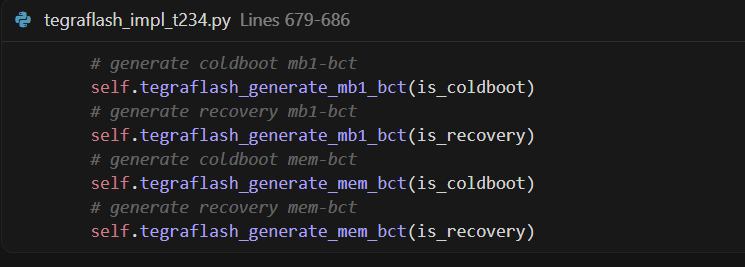
mb1_boot_config_table 类型的 BCT 由 tegrabct 在刷机时动态生成,不是从预定义文件读取。生成逻辑(在 tegraflash_impl_t234.py 中)
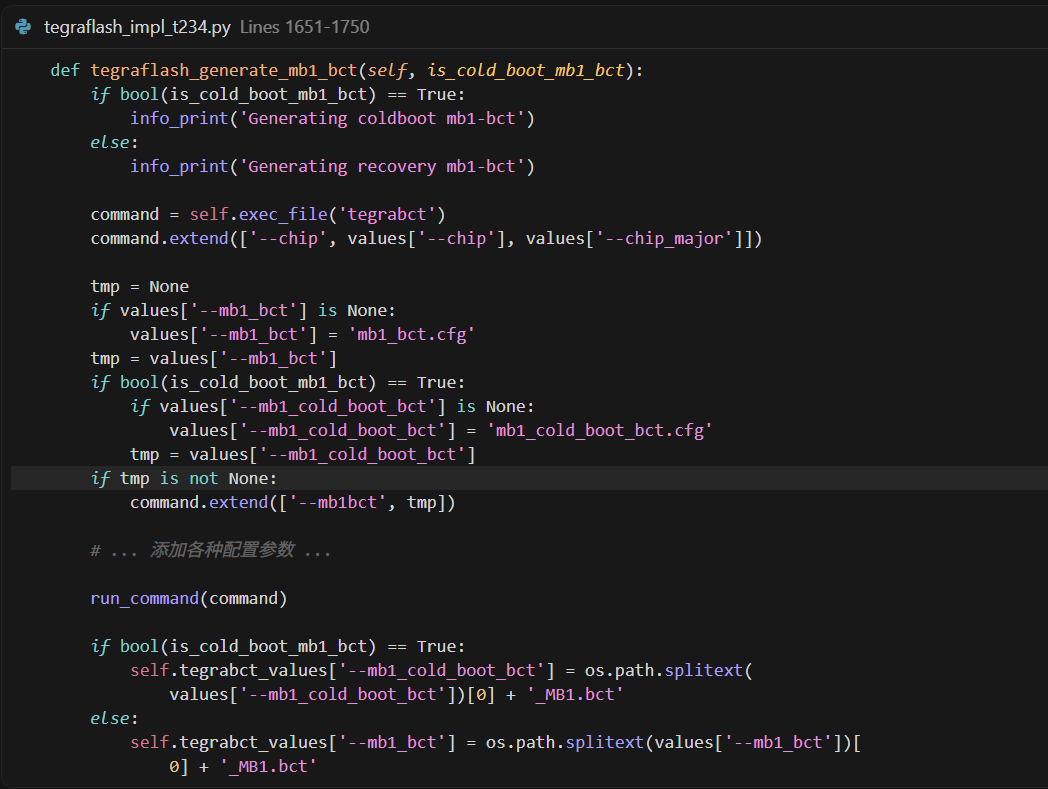
生成的文件名:
-
Coldboot: mb1_cold_boot_bct_MB1.bct
-
Recovery: mb1_bct_MB1.bct
写入分区(在 tegraflash_impl_t234.py 中)
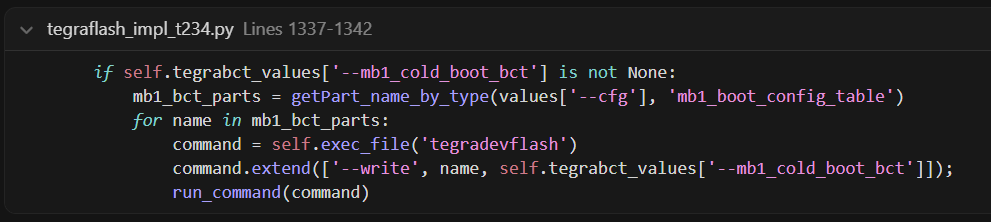
查找所有 type="mb1_boot_config_table" 的分区
将生成的 BCT 文件写入这些分区
        <partition name="A_MEM_BCT" type="mem_boot_config_table">
            <allocation_policy> sequential </allocation_policy>
            <filesystem_type> basic </filesystem_type>
            <size> 262144 </size>
            <file_system_attribute> 0 </file_system_attribute>
            <allocation_attribute> 8 </allocation_attribute>
            <percent_reserved> 0 </percent_reserved>
            <align_boundary> 65536 </align_boundary>
-
分区名称: A_MEM_BCT
-
分区类型: mem_boot_config_table (Memory Boot Configuration Table)
-
存储位置: QSPI Flash
-
分区大小: 262144 字节(256 KB)
-
对齐边界: 65536 字节(64 KB)
-
需要 OEM 签名: 是(根据 l4t_bup_gen.func)
-
固件文件名: 无(由工具动态生成)
MEM_BCT 是内存启动配置表,包含 DDR/LPDDR 的详细配置,用于初始化和管理系统内存。
DDR/LPDDR5 内存配置
-
内存类型(LPDDR5、DDR4 等)
-
内存容量(4GB、8GB、16GB、32GB 等)
-
内存频率和时序参数
-
内存通道配置(单通道、双通道等)
EMC(External Memory Controller)配置
-
EMC 时钟配置(PLL 设置)
-
内存控制器寄存器配置
-
电气特性参数(电压、信号完整性等)
-
内存训练参数
内存初始化序列
-
内存初始化步骤和序列
-
内存训练序列
-
内存校准参数
板级内存配置
-
不同内存模块的支持(Micron、Samsung、Hynix 等)
-
多套内存配置(mem_cfg_0, mem_cfg_1, mem_cfg_2, mem_cfg_3)
-
根据 RAMCODE 选择配置
MEM_BCT 由 tegrabct 工具根据 SDRAM 配置 DTS 文件生成。
p3701.conf.commonLines 205-206
EMMC_BCT="tegra234-p3701-0000-sdram-l4t.dts";
WB0SDRAM_BCT="tegra234-p3701-0000-wb0sdram-l4t.dts";
-
主配置文件: EMMC_BCT - 正常启动时的内存配置
-
温启动配置: WB0SDRAM_BCT - SC7 睡眠/唤醒时的内存配置
从代码中可以看到,MEM_BCT 生成时会创建多个配置:
tegraflash_internal.pyLines 4300-4301
mem_bcts = [filename + "_1.bct", filename + "_2.bct", filename + "_3.bct", filename + "_4.bct",]
command.extend(['--membct', mem_bcts[0], mem_bcts[1], mem_bcts[2], mem_bcts[3]])
生成 4 个内存配置:
-
mem_cfg_0: 第一种内存配置(如 Micron LPDDR5)
-
mem_cfg_1: 第二种内存配置(如 Hynix LPDDR5)
-
mem_cfg_2: 第三种内存配置(如 Samsung LPDDR5)
-
mem_cfg_3: 第四种内存配置(备用配置)
系统启动时根据 RAMCODE(通过 fuse 或硬件检测)选择对应的配置。
从代码中可以看到内存配置包含的详细参数:
tegra234-mb1-bct-p3767-0000-rc00-204mhz.dtsiLines 13-28
mem_cfg_0: mem-cfg@0 {
MemoryType = "NvBootMemoryType_LpDdr5";
MemIoVoltage = <1100>;
MemBctRevision = <0x00000001>;
PllMInputDivider = <0x00000001>;
PllMFeedbackDivider = <0x00000022>;
PllMStableTime = <0x0000012c>;
PllMSetupControl = <0x00000000>;
PllMPostDivider = <0x00000000>;
PllMKCP = <0x00000000>;
PllMKVCO = <0x00000000>;
InitExtraForFpga = <0x00000000>;
PllHubMValue = <0x00000002>;
PllHubNValue = <0x00000037>;
PllHubPValue = <0x00000001>;
PllHubNFracValue = <0x000010aa>;
这些参数包括:
-
内存类型:LPDDR5
-
工作电压:1.1V
-
PLL 配置:时钟生成器的详细参数
-
EMC 寄存器配置:内存控制器的详细设置
mem_boot_config_table 类型的 BCT 在刷机时动态生成,不是从预定义文件读取。生成逻辑(在 tegraflash_impl_t234.py 中)
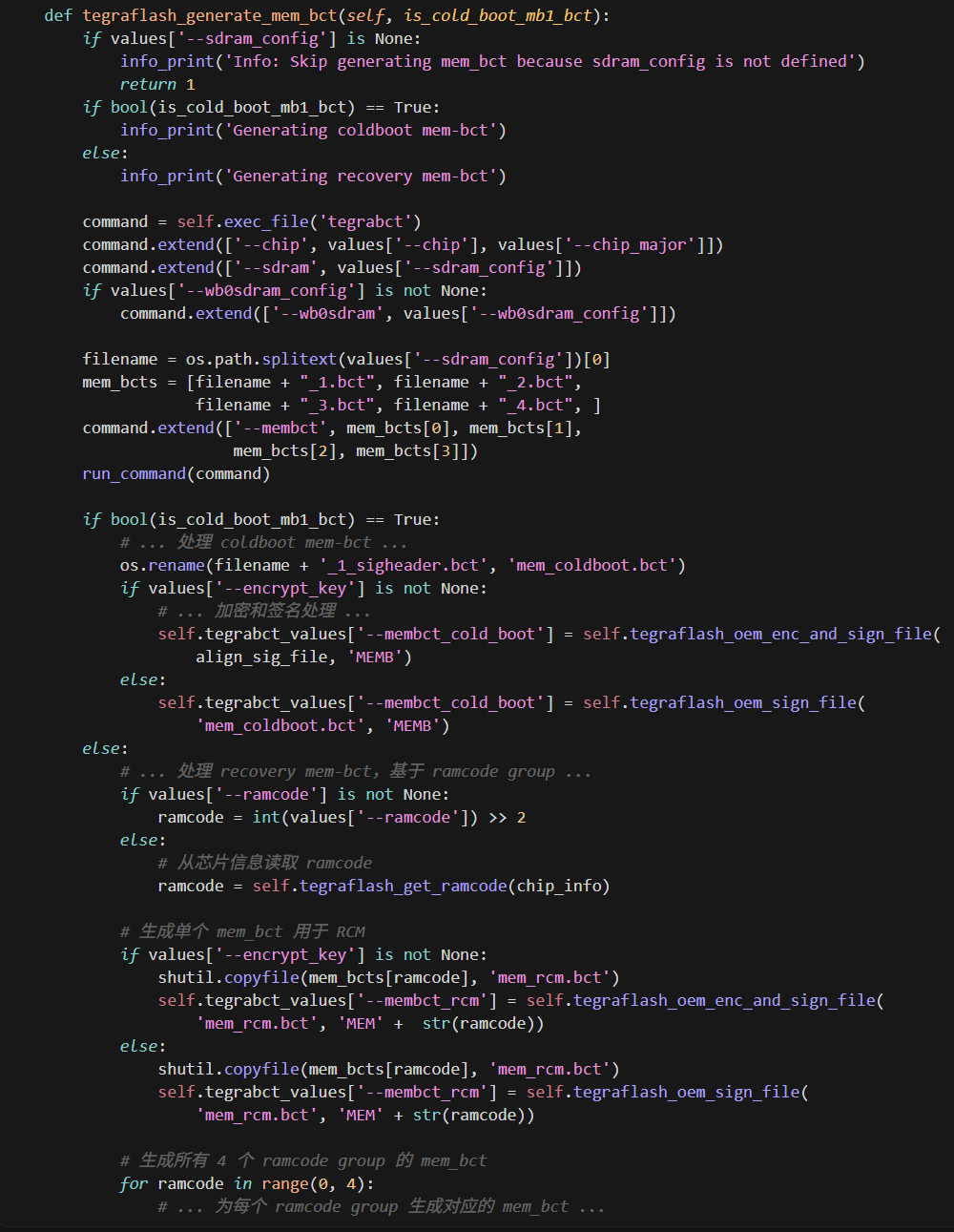
关键特点
生成多个 BCT 文件(支持多个 RAM code)
-
一次生成 4 个:filename_1.bct, filename_2.bct, filename_3.bct, filename_4.bct
-
对应不同的 RAM code group(0-3)
Coldboot 模式
-
使用 filename_1_sigheader.bct,重命名为 mem_coldboot.bct
-
最终文件名:mem_coldboot.bct(签名后可能变为带签名的文件名)
Recovery 模式
-
根据 ramcode group 选择对应的 BCT
-
生成 RCM 使用的 mem_rcm.bct
-
同时生成 4 个 ramcode group 的版本:mem_rcm_0.bct, mem_rcm_1.bct, mem_rcm_2.bct, mem_rcm_3.bct
Cold Mem BCT 和 Recovery Mem BCT 的区别
-
Coldboot Mem BCT → 烧录到MEM_BCT 分区,用于正常启动
-
Recovery Mem BCT → 用于 RCM 模式,临时下载到内存
将生成的 BCT 文件写入这些分区
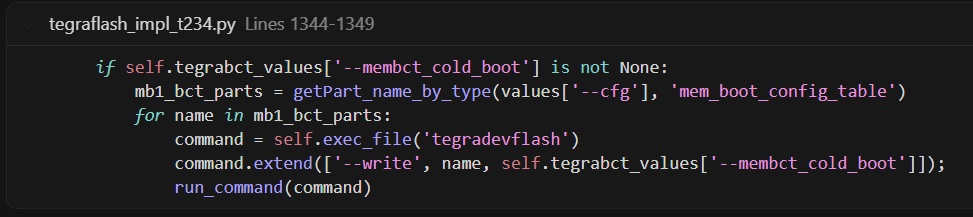
-
查找所有 type="mem_boot_config_table" 的分区
-
将生成的 membct_cold_boot 文件写入这些分区
生成时机:
RAMCODE 是一个 4 位值(0-15),用于标识板载内存(DRAM)的配置信息:
flash.shLines 906-910
# Get ramcode from the board
boardRamcode=$(./chkbdinfo -R chip_info.bin_bak);
chkerr "Getting ramcode failed.";
boardRamcode="$(echo "${boardRamcode}" | cut -d: -f 4)";
boardRamcode="$((16#${boardRamcode} % 16))"
-
从芯片的 chip_info.bin 中读取
-
范围:0-15(4 位)
-
表示不同的内存配置(供应商、型号、时序等)
为什么有 4 个 Group?
分组映射:
-
Group 0:RAMCODE 0-3
-
Group 1:RAMCODE 4-7
-
Group 2:RAMCODE 8-11
-
Group 3:RAMCODE 12-15
原因:
-
内存配置差异:不同供应商/型号需要不同的初始化参数(时序、电压、刷新率等)
-
分组管理:将 16 种 RAMCODE 分为 4 组,每组共享相似的内存配置
-
存储优化:生成 4 个 MEM_BCT 文件,而不是 16 个,减少存储空间
生成的文件:
-
filename_1.bct → Group 0(RAMCODE 0-3)
-
filename_2.bct → Group 1(RAMCODE 4-7)
-
filename_3.bct → Group 2(RAMCODE 8-11)
-
filename_4.bct → Group 3(RAMCODE 12-15)
运行时根据实际 RAMCODE 选择对应的 BCT:
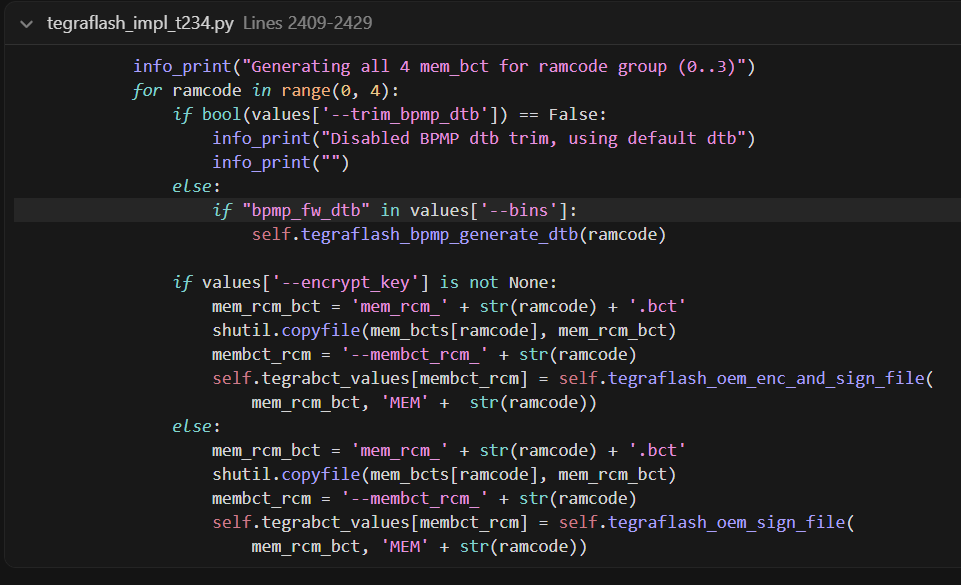
实际工作流程
正常启动(Cold Boot):
- 烧录时:生成 Cold BCT(固定使用 Group 0)
- 启动时:使用烧录的 Cold BCT(Group 0 配置)
- 假设:Group 0 配置适用于该板子
Recovery 模式:
-
RCM 阶段:从芯片读取 ramcode
-
计算:ramcode group = ramcode >> 2
-
选择:使用对应 group 的 Recovery BCT
-
下载:通过 USB 下载到设备内存
</partition>
        <partition name="A_tsec-fw" type="tsec_fw" oem_sign="true">
            <allocation_policy> sequential </allocation_policy>
            <filesystem_type> basic </filesystem_type>
            <size> 1048576 </size>
            <file_system_attribute> 0 </file_system_attribute>
            <allocation_attribute> 8 </allocation_attribute>
            <percent_reserved> 0 </percent_reserved>
            <filename> TSECFW </filename>
            <align_boundary> 65536 </align_boundary>
        </partition>
-
分区名称: A_tsec-fw
-
分区类型: tsec_fw
-
存储位置: QSPI Flash(SPI 设备 0)
-
分区大小: 1048576 字节(1 MB)
-
对齐边界: 65536 字节(64 KB)
-
需要 OEM 签名: oem_sign="true"
-
固件文件名: tsec_t234.bin
固件文件名在配置文件中定义:
p3701.conf.commonLine 178
TSECFW="bootloader/tsec_t234.bin";
TSEC (Trusted Security Engine) 是 NVIDIA Tegra 中的可信安全引擎。该固件的主要功能包括:
- 安全启动验证:在启动过程中验证其他固件和启动镜像的签名
- 加密操作:执行加密/解密,支持安全存储
- 密钥管理:管理安全密钥和证书
- 安全认证:提供安全认证服务
      <partition name="A_nvdec" type="nvdec" oem_sign="true">
            <allocation_policy> sequential </allocation_policy>
            <filesystem_type> basic </filesystem_type>
            <size> 1048576 </size>
            <file_system_attribute> 0 </file_system_attribute>
            <allocation_attribute> 8 </allocation_attribute>
            <percent_reserved> 0 </percent_reserved>
            <filename> NVHOSTNVDEC </filename>
            <align_boundary> 65536 </align_boundary>
        </partition>
-
分区名称: A_nvdec
-
分区类型: nvdec
-
存储位置: QSPI Flash(SPI 设备 0)
-
分区大小: 1048576 字节(1 MB)
-
对齐边界: 65536 字节(64 KB)
-
需要 OEM 签名: oem_sign="true"
固件文件名在配置文件中定义:
p3701.conf.commonLine 179
NVHOSTNVDEC="bootloader/nvdec_t234_prod.fw";
-
固件文件名: nvdec_t234_prod.fw
-
文件路径: bootloader/nvdec_t234_prod.fw
-
配置变量: NVHOSTNVDEC
根据 fuse level(开发或生产),固件文件名会变化:
-
生产版本: nvdec_t234_prod.fw
-
开发版本: nvdec_t234_dev.fw(基于 fuse level 切换)
NVDEC (NVIDIA Video Decoder) 是 NVIDIA Tegra 的硬件视频解码器。该固件的作用包括:
- 硬件初始化:初始化和管理 NVDEC 硬件
- 视频解码:支持硬件加速视频解码(如 H.264、H.265/HEVC、VP8、VP9 等)
- 性能优化:提供硬件加速以降低 CPU 负载
- 功耗管理:在视频解码过程中进行功耗控制
        <partition name="A_mb2" type="mb2_bootloader" oem_sign="true">
            <allocation_policy> sequential </allocation_policy>
            <filesystem_type> basic </filesystem_type>
            <size> 524288 </size>
            <file_system_attribute> 0 </file_system_attribute>
            <allocation_attribute> 8 </allocation_attribute>
            <percent_reserved> 0 </percent_reserved>
            <filename> MB2BLFILE </filename>
            <align_boundary> 65536 </align_boundary>
        </partition>
-
分区名称: A_mb2
-
分区类型: mb2_bootloader
-
存储位置: QSPI Flash(SPI 设备 0)
-
分区大小: 524288 字节(512 KB)
-
对齐边界: 65536 字节(64 KB)
-
需要 OEM 签名: oem_sign="true"
固件文件名在配置文件中定义:
p3701.conf.commonLine 183
MB2BLFILE="bootloader/mb2_t234.bin";
此外,配置文件中也定义了相关变量:
p3701.conf.commonLines 167-168
TEGRABOOT="bootloader/mb2_t234.bin";
BOOTLOADER="bootloader/mb2_t234.bin";
-
固件文件名: mb2_t234.bin
-
文件路径: bootloader/mb2_t234.bin
-
配置变量: MB2BLFILE、TEGRABOOT、BOOTLOADER
MB2 (Mini-Bootloader 2) 是第二阶段引导程序,在启动链中位置如下:
启动流程中的位置
- BootROM → MB1 → MB2 → CPU Bootloader (UEFI/TegraBoot)
主要功能
-
系统初始化:完成由 MB1 开始的系统初始化
-
内存配置:配置和管理系统内存
-
硬件初始化:初始化必要的硬件模块
-
加载下一阶段:加载并验证下一阶段引导程序(CPU Bootloader)
-
安全验证:验证后续引导程序的签名和完整性
MB2 BCT 配置
MB2 有自己的 BCT(Boot Configuration Table)配置文件:
p3701.conf.commonLine 212
SCR_CONFIG="tegra234-mb2-bct-scr-p3701-0000.dts";
p3701.conf.commonLine 222
MB2_BCT="tegra234-mb2-bct-misc-p3701-0000.dts";
MB2 还与其他相关分区配合:
-
A_mb2rf (MB2 Recovery Firmware):MB2 的恢复固件,用于故障恢复场景
-
MB2 BCT:MB2 的引导配置表,包含 MB2 运行所需的配置信息
        <partition name="A_xusb-fw" type="xusb_fw" oem_sign="true">
            <allocation_policy> sequential </allocation_policy>
            <filesystem_type> basic </filesystem_type>
            <size> 262144 </size>
            <file_system_attribute> 0 </file_system_attribute>
            <allocation_attribute> 8 </allocation_attribute>
            <percent_reserved> 0 </percent_reserved>
            <filename> XUSB_FW </filename>
            <align_boundary> 65536 </align_boundary>
        </partition>
-
分区名称: A_xusb-fw
-
分区类型: xusb_fw
-
存储位置: QSPI Flash(SPI 设备 0)
-
分区大小: 262144 字节(256 KB)
-
对齐边界: 65536 字节(64 KB)
-
需要 OEM 签名: oem_sign="true"
固件文件名在配置文件中定义:
p3701.conf.commonLine 193
XUSBFILE="bootloader/xusb_t234_prod.bin";
-
固件文件名: xusb_t234_prod.bin
-
文件路径: bootloader/xusb_t234_prod.bin
-
配置变量: XUSBFILE
根据 fuse level(开发或生产),固件文件名会变化:
-
生产版本: xusb_t234_prod.bin
-
开发版本: xusb_t234_dev.bin(根据 fuse level 自动切换)
XUSB (Extended USB) 是 NVIDIA Tegra 的扩展 USB 控制器固件。主要功能包括:
USB 控制器初始化
-
初始化 XUSB 控制器硬件
-
配置 USB 主机和设备的物理层
支持 USB Host 模式
-
支持 USB 2.0 和 USB 3.0
-
支持 USB 设备枚举与管理
-
用于连接 USB 外设(键盘、鼠标、存储设备等)
支持 USB Device 模式
-
支持 USB 设备模式(OTG)
-
可用于 USB 调试和烧录
-
支持 USB Mass Storage、USB 网络等
启动阶段使用
-
在启动阶段初始化 USB 功能
-
支持从 USB 设备启动或通过 USB 进行系统更新
        <partition name="A_bpmp-fw" type="bpmp_fw" oem_sign="true">
            <allocation_policy> sequential </allocation_policy>
            <filesystem_type> basic </filesystem_type>
            <size> 1572864 </size>
            <file_system_attribute> 0 </file_system_attribute>
            <allocation_attribute> 8 </allocation_attribute>
            <percent_reserved> 0 </percent_reserved>
            <filename> BPFFILE </filename>
            <align_boundary> 65536 </align_boundary>
        </partition>
-
分区名称: A_bpmp-fw
-
分区类型: bpmp_fw
-
存储位置: QSPI Flash(SPI 设备 0)
-
分区大小: 1572864 字节(1.5 MB)
-
对齐边界: 65536 字节(64 KB)
-
需要 OEM 签名: oem_sign="true"
p3701.conf.commonLine 173
BPFFILE="bootloader/bpmp_t234-TE990M-A1_prod.bin";
-
固件文件名: bpmp_t234-TE990M-A1_prod.bin(根据芯片 SKU 不同而变)
-
文件路径: bootloader/bpmp_t234-TE990M-A1_prod.bin
-
配置变量: BPFFILE
常见固件版本:
-
TE990M-A1 - 默认版本(D0、D2 SKU)
-
TE992M-A1 - 90 SKU
-
TA990SA-A1 - 97、9E SKU
BPMP (Boot and Power Management Processor) 是一个独立的协处理器,主要功能包括:
- 电源管理:管理 CPU、GPU 等电源域
- 时钟管理:控制各模块时钟
- 温度监控:监控芯片温度并控制风扇
- 低功耗模式:管理睡眠、唤醒等低功耗状态
- 硬件初始化:初始化和管理部分硬件模块
- 运行时服务:在系统运行时提供电源、时钟等服务
        <partition name="A_bpmp-fw-dtb" type="bpmp_fw_dtb" oem_sign="true">
            <allocation_policy> sequential </allocation_policy>
            <filesystem_type> basic </filesystem_type>
            <size> 4194304 </size>
            <file_system_attribute> 0 </file_system_attribute>
            <allocation_attribute> 8 </allocation_attribute>
            <percent_reserved> 0 </percent_reserved>
            <filename> BPFDTB_FILE </filename>
            <align_boundary> 65536 </align_boundary>
-
分区名称: A_bpmp-fw-dtb
-
分区类型: bpmp_fw_dtb
-
存储位置: QSPI Flash(SPI 设备 0)
-
分区大小: 4194304 字节(4 MB)
-
对齐边界: 65536 字节(64 KB)
-
需要 OEM 签名: oem_sign="true"
BPMP DTB 文件是板子特定的,通常在板子配置文件中定义,例如:
-
文件名格式: tegra234-bpmp-
- .dtb -
配置变量: BPFDTB_FILE
-
文件路径: 在编译时由配置文件指定
BPMP 设备树文件包含板子特定的配置信息:
- 板子硬件配置:PMIC、传感器等
- 电源配置:电压域、电源序列
- 时钟配置:时钟频率、分频器
- GPIO 配置:GPIO 引脚配置
- I2C/SPI 配置:总线和设备配置
- 温度监控配置:温度传感器配置
两个分区的关系
- A_bpmp-fw:BPMP 固件的通用二进制文件,包含核心功能
- A_bpmp-fw-dtb:板子特定的配置,告诉 BPMP 固件如何配置和使用硬件
两个分区配合工作:
-
BPMP 固件读取 DTB 文件获取硬件配置
-
根据 DTB 配置初始化和管理硬件
        </partition>
        <partition name="A_psc-fw" type="psc_fw" oem_sign="true">
            <allocation_policy> sequential </allocation_policy>
            <filesystem_type> basic </filesystem_type>
            <size> 786432 </size>
            <file_system_attribute> 0 </file_system_attribute>
            <allocation_attribute> 8 </allocation_attribute>
            <percent_reserved> 0 </percent_reserved>
            <filename> PSCFW </filename>
            <align_boundary> 65536 </align_boundary>
        </partition>
-
分区名称: A_psc-fw
-
分区类型: psc_fw
-
存储位置: QSPI Flash
-
分区大小: 786432 字节(768 KB)
-
对齐边界: 65536 字节(64 KB)
-
需要 OEM 签名: oem_sign="true"
p3701.conf.commonLine 177
PSCFW="bootloader/pscfw_t234_prod.bin";
-
固件文件名: pscfw_t234_prod.bin
-
文件路径: bootloader/pscfw_t234_prod.bin
-
配置变量: PSCFW
PSC (Platform Security Controller) 是平台安全控制器固件,主要功能包括:
- 安全启动:参与安全启动验证
- 安全密钥管理:管理和保护安全密钥
- 安全策略执行:执行安全策略和访问控制
- 平台安全初始化:初始化平台安全相关硬件
        <partition name="A_mts-mce" type="mts_mce" oem_sign="true">
            <allocation_policy> sequential </allocation_policy>
            <filesystem_type> basic </filesystem_type>
            <size> 524288 </size>
            <file_system_attribute> 0 </file_system_attribute>
            <allocation_attribute> 8 </allocation_attribute>
            <percent_reserved> 0 </percent_reserved>
            <filename> MCE_IMAGE </filename>
            <align_boundary> 65536 </align_boundary>
        </partition>
-
分区名称: A_mts-mce
-
分区类型: mts_mce
-
存储位置: QSPI Flash
-
分区大小: 524288 字节(512 KB)
-
对齐边界: 65536 字节(64 KB)
-
需要 OEM 签名: oem_sign="true"
p3701.conf.commonLine 190
MTSMCEFILE="bootloader/mce_flash_o10_cr_prod.bin";
-
固件文件名: mce_flash_o10_cr_prod.bin
-
文件路径: bootloader/mce_flash_o10_cr_prod.bin
-
配置变量: MTSMCEFILE
MTS (Memory Test System) MCE (Memory Controller Engine) 是内存测试系统与内存控制器引擎固件,主要功能包括:
- 内存控制器管理:初始化和配置内存控制器
- 内存测试:在启动阶段进行内存测试和验证
- 内存错误检测:检测和报告内存错误(如 ECC 错误)
- 内存时序配置:配置内存时序参数
        <partition name="A_sc7" type="WB0">
            <allocation_policy> sequential </allocation_policy>
            <filesystem_type> basic </filesystem_type>
            <size> 196608 </size>
            <file_system_attribute> 0 </file_system_attribute>
            <allocation_attribute> 8 </allocation_attribute>
            <percent_reserved> 0 </percent_reserved>
            <filename> WB0FILE </filename>
            <align_boundary> 65536 </align_boundary>
        </partition>
-
分区名称: A_sc7
-
分区类型: WB0(Warm Boot 0)
-
存储位置: QSPI Flash
-
分区大小: 196608 字节(192 KB)
-
对齐边界: 65536 字节(64 KB)
-
需要 OEM 签名: 无(类型为 WB0,不是 oem_sign)
p3701.conf.commonLine 195
WB0BOOT="bootloader/sc7_t234_prod.bin";
-
固件文件名: sc7_t234_prod.bin
-
文件路径: bootloader/sc7_t234_prod.bin
-
配置变量: WB0BOOT、WB0FILE
SC7 (Sleep Controller 7) / WB0 (Warm Boot 0) 是睡眠控制器/温启动固件,主要功能包括:
睡眠模式管理:管理系统进入 SC7 睡眠模式
快速唤醒:从睡眠模式快速唤醒系统
状态保存和恢复:保存系统状态,唤醒时恢复
低功耗管理:在睡眠期间管理低功耗状态
内存保持:在睡眠模式下保持内存内容(如果配置)
        <partition name="A_pscrf" type="psc_rf" oem_sign="true">
            <allocation_policy> sequential </allocation_policy>
            <filesystem_type> basic </filesystem_type>
            <size> 196608 </size>
            <file_system_attribute> 0 </file_system_attribute>
            <allocation_attribute> 8 </allocation_attribute>
            <percent_reserved> 0 </percent_reserved>
            <filename> PSCRF_IMAGE </filename>
            <align_boundary> 65536 </align_boundary>
        </partition>
-
分区名称: A_pscrf
-
分区类型: psc_rf (PSC RF - Recovery Firmware)
-
分区大小: 196608 字节(192 KB)
-
需要 OEM 签名: 是
p3701.conf.commonLine 197
PSC_RF="bootloader/psc_rf_t234_prod.bin";
-
固件文件名: psc_rf_t234_prod.bin
-
配置变量: PSC_RF
PSC RF 是平台安全控制器的恢复固件,用于安全启动验证和恢复操作。
        <partition name="A_mb2rf" type="mb2rf" oem_sign="true">
            <allocation_policy> sequential </allocation_policy>
            <filesystem_type> basic </filesystem_type>
            <size> 131072 </size>
            <file_system_attribute> 0 </file_system_attribute>
            <allocation_attribute> 8 </allocation_attribute>
            <percent_reserved> 0 </percent_reserved>
            <filename> MB2RF_IMAGE </filename>
            <align_boundary> 65536 </align_boundary>
        </partition>
-
分区名称: A_mb2rf
-
分区类型: mb2rf (MB2 Recovery Firmware)
-
分区大小: 131072 字节(128 KB)
-
需要 OEM 签名: 是
p3701.conf.commonLine 196
MB2_RF="bootloader/mb2rf_t234.bin";
-
固件文件名: mb2rf_t234.bin
-
配置变量: MB2_RF
MB2 RF 是 Mini-Bootloader 2 的恢复固件,用于从恢复模式启动系统。
        <partition name="A_cpu-bootloader" type="bootloader_stage2" oem_sign="true" compress="true" comp_algo="lz4">
            <allocation_policy> sequential </allocation_policy>
            <filesystem_type> basic </filesystem_type>
            <size> 3670016 </size>
            <file_system_attribute> 0 </file_system_attribute>
            <allocation_attribute> 8 </allocation_attribute>
            <percent_reserved> 0 </percent_reserved>
            <filename> TBCDTB-FILE </filename>
            <align_boundary> 65536 </align_boundary>
        </partition>
-
分区名称: A_cpu-bootloader
-
分区类型: bootloader_stage2 (第二阶段启动加载器)
-
分区大小: 3670016 字节(约 3.5 MB)
-
需要 OEM 签名: 是
-
压缩算法: LZ4
p3701.conf.commonLines 169-171
UEFIBL="uefi_jetson_with_dtb.bin";
RCM_UEFIBL="uefi_jetson_minimal_with_dtb.bin";
TBCFILE="bootloader/uefi_jetson.bin";
-
固件文件名: uefi_jetson_with_dtb.bin (UEFI + DTB 组合)
-
配置变量: UEFIBL / TBCDTB_FILE
CPU Bootloader 是第二阶段启动加载器(UEFI),负责:
- 初始化 CPU 和内存子系统
- 加载和启动操作系统
- 提供 UEFI 接口
- 支持安全启动和系统配置
        <partition name="A_secure-os" type="tos" oem_sign="true">
            <allocation_policy> sequential </allocation_policy>
            <filesystem_type> basic </filesystem_type>
            <size> 4194304 </size>
            <file_system_attribute> 0 </file_system_attribute>
            <allocation_attribute> 8 </allocation_attribute>
            <percent_reserved> 0 </percent_reserved>
            <filename> TOSFILE </filename>
            <align_boundary> 65536 </align_boundary>
        </partition>
-
分区名称: A_secure-os
-
分区类型: tos (Trusted OS)
-
分区大小: 4194304 字节(4 MB)
-
需要 OEM 签名: 是
p3701.conf.commonLine 174
TOSFILE="bootloader/tos_t234.img";
-
固件文件名: tos_t234.img
-
配置变量: TOSFILE
Trusted OS (TOS) 是可信执行环境(TEE),提供:
- 安全服务(加密、密钥管理)
- 隔离的安全执行环境
- 安全存储和密钥保护
- 与正常操作系统的安全通信
        <partition name="A_smm-fw" type="data" oem_sign="true">
            <allocation_policy> sequential </allocation_policy>
            <filesystem_type> basic </filesystem_type>
            <size> 2097152 </size>
            <file_system_attribute> 0 </file_system_attribute>
            <allocation_attribute> 8 </allocation_attribute>
            <percent_reserved> 0 </percent_reserved>
            <align_boundary> 65536 </align_boundary>
        </partition>
-
分区名称: A_smm-fw
-
分区类型: data (数据分区)
-
分区大小: 2097152 字节(2 MB)
-
需要 OEM 签名: 是
-
注意: 该分区未指定 filename 字段,可能是动态分配或可选分区
SMM FW (System Management Mode Firmware) 用于系统管理模式,提供系统管理和监控功能(在 UEFI 环境中使用)。
        <partition name="A_eks" type="eks" oem_sign="true">
            <allocation_policy> sequential </allocation_policy>
            <filesystem_type> basic </filesystem_type>
            <size> 262144 </size>
            <file_system_attribute> 0 </file_system_attribute>
            <allocation_attribute> 8 </allocation_attribute>
            <percent_reserved> 0 </percent_reserved>
            <filename> EKSFILE </filename>
            <align_boundary> 65536 </align_boundary>
        </partition>
-
分区名称: A_eks
-
分区类型: eks (Encryption Key Storage)
-
分区大小: 262144 字节(256 KB)
-
需要 OEM 签名: 是
p3701.conf.commonLine 175
EKSFILE="bootloader/eks_t234.img";
-
固件文件名: eks_t234.img
-
配置变量: EKSFILE
EKS (Encryption Key Storage) 用于存储加密密钥,支持:
- 密钥管理和存储
- 加密/解密操作
- 安全密钥分发
        <partition name="A_dce-fw" type="dce_fw" oem_sign="true" compress="true" comp_algo="lz4">
            <allocation_policy> sequential </allocation_policy>
            <filesystem_type> basic </filesystem_type>
            <size> 5242880 </size>
            <file_system_attribute> 0 </file_system_attribute>
            <allocation_attribute> 8 </allocation_attribute>
            <percent_reserved> 0 </percent_reserved>
            <filename> DCE </filename>
            <align_boundary> 65536 </align_boundary>
        </partition>
-
分区名称: A_dce-fw
-
分区类型: dce_fw (Display Controller Engine Firmware)
-
分区大小: 5242880 字节(5 MB)
-
需要 OEM 签名: 是
-
压缩算法: LZ4
p3701.conf.commonLine 180
DCE="bootloader/display-t234-dce.bin";
-
固件文件名: display-t234-dce.bin
-
配置变量: DCE
DCE (Display Controller Engine) 固件用于显示控制器,负责:
- 显示控制器初始化和管理
- 显示输出配置(HDMI、DisplayPort 等)
- 显示驱动和协议支持
- 显示相关的低级别硬件控制
        <partition name="A_spe-fw" type="spe_fw" oem_sign="true">
            <allocation_policy> sequential </allocation_policy>
            <filesystem_type> basic </filesystem_type>
            <size> 589824 </size>
            <file_system_attribute> 0 </file_system_attribute>
            <allocation_attribute> 8 </allocation_attribute>
            <percent_reserved> 0 </percent_reserved>
            <filename> SPEFILE </filename>
            <align_boundary> 65536 </align_boundary>
        </partition>
-
分区名称: A_spe-fw
-
分区类型: spe_fw (Safety Processing Engine Firmware)
-
分区大小: 589824 字节(576 KB)
-
需要 OEM 签名: 是
p3701.conf.commonLine 184
SPEFILE="bootloader/spe_t234.bin";
-
固件文件名: spe_t234.bin
-
配置变量: SPEFILE
SPE (Safety Processing Engine) 固件用于安全关键应用,提供:
- 安全关键任务处理
- 功能安全支持
- 安全监控和诊断
- 符合安全标准的功能(如 ISO 26262)
        <partition name="A_rce-fw" type="rce_fw" oem_sign="true">
            <allocation_policy> sequential </allocation_policy>
            <filesystem_type> basic </filesystem_type>
            <size> 1048576 </size>
            <file_system_attribute> 0 </file_system_attribute>
            <allocation_attribute> 8 </allocation_attribute>
            <percent_reserved> 0 </percent_reserved>
            <filename> CAMERAFW </filename>
            <align_boundary> 65536 </align_boundary>
        </partition>
-
分区名称: A_rce-fw
-
分区类型: rce_fw (Real-time Camera Engine Firmware)
-
分区大小: 1048576 字节(1 MB)
-
需要 OEM 签名: 是
p3701.conf.commonLine 186
CAMERAFW="bootloader/camera-rtcpu-t234-rce.img";
-
固件文件名: camera-rtcpu-t234-rce.img
-
配置变量: CAMERAFW
RCE (Real-time Camera Engine) 固件用于相机实时处理,负责:
- 相机接口管理和控制
- 实时图像处理
- 相机数据流处理
- 相机硬件抽象和驱动
        <partition name="A_adsp-fw" type="ape_fw" oem_sign="true">
            <allocation_policy> sequential </allocation_policy>
            <filesystem_type> basic </filesystem_type>
            <size> 2097152 </size>
            <file_system_attribute> 0 </file_system_attribute>
            <allocation_attribute> 8 </allocation_attribute>
            <percent_reserved> 0 </percent_reserved>
            <filename> adsp-fw.bin </filename>
            <align_boundary> 65536 </align_boundary>
        </partition>
-
分区名称: A_adsp-fw
-
分区类型: ape_fw (Audio Processing Engine Firmware)
-
分区大小: 2097152 字节(2 MB)
-
需要 OEM 签名: 是
p3701.conf.commonLine 192
APEFILE="bootloader/adsp-fw.bin";
-
固件文件名: adsp-fw.bin
-
配置变量: APEFILE
ADSP (Audio Digital Signal Processor) 固件用于音频处理,提供:
- 音频编解码
- 音频信号处理(EQ、降噪等)
- 音频接口管理(I2S、SPDIF 等)
- 低功耗音频处理
        <partition name="A_pva-fw" type="pva_fw" oem_sign="true" compress="true" comp_algo="lz4">
            <allocation_policy> sequential </allocation_policy>
            <filesystem_type> basic </filesystem_type>
            <size> 262144 </size>
            <file_system_attribute> 0 </file_system_attribute>
            <allocation_attribute> 8 </allocation_attribute>
            <percent_reserved> 0 </percent_reserved>
            <filename> PVA_FILE </filename>
            <align_boundary> 65536 </align_boundary>
        </partition>
-
分区名称: A_pva-fw
-
分区类型: pva_fw (Programmable Vision Accelerator Firmware)
-
分区大小: 262144 字节(256 KB)
-
需要 OEM 签名: 是
-
压缩算法: LZ4
p3701.conf.commonLine 227
PVAFILE="bootloader/nvpva_020.fw"
-
固件文件名: nvpva_020.fw
-
配置变量: PVAFILE
PVA (Programmable Vision Accelerator) 固件用于可编程视觉加速,提供:
- 计算机视觉和 AI 推理加速
- 图像处理和特征提取
- 神经网络推理支持
- 低延迟视觉处理
        <partition name="A_reserved_on_boot" type="data">
            <allocation_policy> sequential </allocation_policy>
            <filesystem_type> basic </filesystem_type>
            <size> 1114112 </size>
            <file_system_attribute> 0 </file_system_attribute>
            <allocation_attribute> 8 </allocation_attribute>
            <percent_reserved> 0 </percent_reserved>
            <align_boundary> 65536 </align_boundary>
        </partition>
-
分区名称: A_reserved_on_boot
-
分区类型: data(数据分区)
-
存储位置: QSPI Flash
-
分区大小: 1114112 字节(约 1.06 MB)
-
对齐边界: 65536 字节(64 KB)
-
需要 OEM 签名: 否(无 oem_sign 属性)
-
固件文件名: 无(未指定 filename 字段)
A_reserved_on_boot 是启动区域的保留空间,主要用途:
启动链分隔/缓冲
-
作为 A 和 B 启动链之间的缓冲
-
避免分区边界冲突
未来扩展预留
-
为新增启动相关分区或扩展现有分区预留空间
-
便于后续功能扩展
对齐和布局优化
-
保持分区对齐(64 KB 边界)
-
优化 QSPI Flash 布局
临时数据存储(可选)
-
启动过程中的临时数据
-
调试和诊断信息
| 分区名称 | 位置 | 大小 | 用途 |
|---|---|---|---|
| A_reserved_on_boot | A 启动链末尾 | 1.06 MB | 启动区域保留空间 |
| B_reserved_on_boot | B 启动链末尾 | 1.06 MB | 启动区域保留空间 |
| A_reserved_on_user | A 用户数据区域 | 约 31.6 MB | 用户数据区域保留空间 |
| B_reserved_on_user | B 用户数据区域 | 约 31.6 MB | 用户数据区域保留空间 |
| reserved | 分区表末尾 | 196 KB | 通用保留空间 |
 <partition name="B_mb1" type="mb1_bootloader">
            <allocation_policy> sequential </allocation_policy>
            <filesystem_type> basic </filesystem_type>
            <size> 524288 </size>
            <file_system_attribute> 0 </file_system_attribute>
            <allocation_attribute> 8 </allocation_attribute>
            <percent_reserved> 0 </percent_reserved>
            <filename> MB1FILE </filename>
            <align_boundary> 262144 </align_boundary>
        </partition>
        <partition name="B_psc_bl1" type="psc_bl1">
            <allocation_policy> sequential </allocation_policy>
            <filesystem_type> basic </filesystem_type>
            <size> 262144 </size>
            <file_system_attribute> 0 </file_system_attribute>
            <allocation_attribute> 8 </allocation_attribute>
            <percent_reserved> 0 </percent_reserved>
            <filename> PSCBL1FILE </filename>
            <align_boundary> 65536 </align_boundary>
        </partition>
        <partition name="B_MB1_BCT" type="mb1_boot_config_table">
            <allocation_policy> sequential </allocation_policy>
            <filesystem_type> basic </filesystem_type>
            <size> 131072 </size>
            <file_system_attribute> 0 </file_system_attribute>
            <allocation_attribute> 8 </allocation_attribute>
            <percent_reserved> 0 </percent_reserved>
            <align_boundary> 65536 </align_boundary>
        </partition>
        <partition name="B_MEM_BCT" type="mem_boot_config_table">
            <allocation_policy> sequential </allocation_policy>
            <filesystem_type> basic </filesystem_type>
            <size> 262144 </size>
            <file_system_attribute> 0 </file_system_attribute>
            <allocation_attribute> 8 </allocation_attribute>
            <percent_reserved> 0 </percent_reserved>
            <align_boundary> 65536 </align_boundary>
        </partition>
        <partition name="B_tsec-fw" type="tsec_fw" oem_sign="true">
            <allocation_policy> sequential </allocation_policy>
            <filesystem_type> basic </filesystem_type>
            <size> 1048576 </size>
            <file_system_attribute> 0 </file_system_attribute>
            <allocation_attribute> 8 </allocation_attribute>
            <percent_reserved> 0 </percent_reserved>
            <filename> TSECFW </filename>
            <align_boundary> 65536 </align_boundary>
        </partition>
        <partition name="B_nvdec" type="nvdec" oem_sign="true">
            <allocation_policy> sequential </allocation_policy>
            <filesystem_type> basic </filesystem_type>
            <size> 1048576 </size>
            <file_system_attribute> 0 </file_system_attribute>
            <allocation_attribute> 8 </allocation_attribute>
            <percent_reserved> 0 </percent_reserved>
            <filename> NVHOSTNVDEC </filename>
            <align_boundary> 65536 </align_boundary>
        </partition>
        <partition name="B_mb2" type="mb2_bootloader" oem_sign="true">
            <allocation_policy> sequential </allocation_policy>
            <filesystem_type> basic </filesystem_type>
            <size> 524288 </size>
            <file_system_attribute> 0 </file_system_attribute>
            <allocation_attribute> 8 </allocation_attribute>
            <percent_reserved> 0 </percent_reserved>
            <filename> MB2BLFILE </filename>
            <align_boundary> 65536 </align_boundary>
        </partition>
        <partition name="B_xusb-fw" type="xusb_fw" oem_sign="true">
            <allocation_policy> sequential </allocation_policy>
            <filesystem_type> basic </filesystem_type>
            <size> 262144 </size>
            <file_system_attribute> 0 </file_system_attribute>
            <allocation_attribute> 8 </allocation_attribute>
            <percent_reserved> 0 </percent_reserved>
            <filename> XUSB_FW </filename>
            <align_boundary> 65536 </align_boundary>
        </partition>
        <partition name="B_bpmp-fw" type="bpmp_fw" oem_sign="true">
            <allocation_policy> sequential </allocation_policy>
            <filesystem_type> basic </filesystem_type>
            <size> 1572864 </size>
            <file_system_attribute> 0 </file_system_attribute>
            <allocation_attribute> 8 </allocation_attribute>
            <percent_reserved> 0 </percent_reserved>
            <filename> BPFFILE </filename>
            <align_boundary> 65536 </align_boundary>
        </partition>
        <partition name="B_bpmp-fw-dtb" type="bpmp_fw_dtb" oem_sign="true">
            <allocation_policy> sequential </allocation_policy>
            <filesystem_type> basic </filesystem_type>
            <size> 4194304 </size>
            <file_system_attribute> 0 </file_system_attribute>
            <allocation_attribute> 8 </allocation_attribute>
            <percent_reserved> 0 </percent_reserved>
            <filename> BPFDTB_FILE </filename>
            <align_boundary> 65536 </align_boundary>
        </partition>
        <partition name="B_psc-fw" type="psc_fw" oem_sign="true">
            <allocation_policy> sequential </allocation_policy>
            <filesystem_type> basic </filesystem_type>
            <size> 786432 </size>
            <file_system_attribute> 0 </file_system_attribute>
            <allocation_attribute> 8 </allocation_attribute>
            <percent_reserved> 0 </percent_reserved>
            <filename> PSCFW </filename>
            <align_boundary> 65536 </align_boundary>
        </partition>
        <partition name="B_mts-mce" type="mts_mce" oem_sign="true">
            <allocation_policy> sequential </allocation_policy>
            <filesystem_type> basic </filesystem_type>
            <size> 524288 </size>
            <file_system_attribute> 0 </file_system_attribute>
            <allocation_attribute> 8 </allocation_attribute>
            <percent_reserved> 0 </percent_reserved>
            <filename> MCE_IMAGE </filename>
            <align_boundary> 65536 </align_boundary>
        </partition>
        <partition name="B_sc7" type="WB0">
            <allocation_policy> sequential </allocation_policy>
            <filesystem_type> basic </filesystem_type>
            <size> 196608 </size>
            <file_system_attribute> 0 </file_system_attribute>
            <allocation_attribute> 8 </allocation_attribute>
            <percent_reserved> 0 </percent_reserved>
            <filename> WB0FILE </filename>
            <align_boundary> 65536 </align_boundary>
        </partition>
        <partition name="B_pscrf" type="psc_rf" oem_sign="true">
            <allocation_policy> sequential </allocation_policy>
            <filesystem_type> basic </filesystem_type>
            <size> 196608 </size>
            <file_system_attribute> 0 </file_system_attribute>
            <allocation_attribute> 8 </allocation_attribute>
            <percent_reserved> 0 </percent_reserved>
            <filename> PSCRF_IMAGE </filename>
            <align_boundary> 65536 </align_boundary>
        </partition>
        <partition name="B_mb2rf" type="mb2rf" oem_sign="true">
            <allocation_policy> sequential </allocation_policy>
            <filesystem_type> basic </filesystem_type>
            <size> 131072 </size>
            <file_system_attribute> 0 </file_system_attribute>
            <allocation_attribute> 8 </allocation_attribute>
            <percent_reserved> 0 </percent_reserved>
            <filename> MB2RF_IMAGE </filename>
            <align_boundary> 65536 </align_boundary>
        </partition>
        <partition name="B_cpu-bootloader" type="bootloader_stage2" oem_sign="true" compress="true" comp_algo="lz4">
            <allocation_policy> sequential </allocation_policy>
            <filesystem_type> basic </filesystem_type>
            <size> 3670016 </size>
            <file_system_attribute> 0 </file_system_attribute>
            <allocation_attribute> 8 </allocation_attribute>
            <percent_reserved> 0 </percent_reserved>
            <filename> TBCDTB-FILE </filename>
            <align_boundary> 65536 </align_boundary>
        </partition>
        <partition name="B_secure-os" type="tos" oem_sign="true">
            <allocation_policy> sequential </allocation_policy>
            <filesystem_type> basic </filesystem_type>
            <size> 4194304 </size>
            <file_system_attribute> 0 </file_system_attribute>
            <allocation_attribute> 8 </allocation_attribute>
            <percent_reserved> 0 </percent_reserved>
            <filename> TOSFILE </filename>
            <align_boundary> 65536 </align_boundary>
        </partition>
        <partition name="B_smm-fw" type="data" oem_sign="true">
            <allocation_policy> sequential </allocation_policy>
            <filesystem_type> basic </filesystem_type>
            <size> 2097152 </size>
            <file_system_attribute> 0 </file_system_attribute>
            <allocation_attribute> 8 </allocation_attribute>
            <percent_reserved> 0 </percent_reserved>
            <align_boundary> 65536 </align_boundary>
        </partition>
        <partition name="B_eks" type="eks" oem_sign="true">
            <allocation_policy> sequential </allocation_policy>
            <filesystem_type> basic </filesystem_type>
            <size> 262144 </size>
            <file_system_attribute> 0 </file_system_attribute>
            <allocation_attribute> 8 </allocation_attribute>
            <percent_reserved> 0 </percent_reserved>
            <filename> EKSFILE </filename>
            <align_boundary> 65536 </align_boundary>
        </partition>
        <partition name="B_dce-fw" type="dce_fw" oem_sign="true" compress="true" comp_algo="lz4">
            <allocation_policy> sequential </allocation_policy>
            <filesystem_type> basic </filesystem_type>
            <size> 5242880 </size>
            <file_system_attribute> 0 </file_system_attribute>
            <allocation_attribute> 8 </allocation_attribute>
            <percent_reserved> 0 </percent_reserved>
            <filename> DCE </filename>
            <align_boundary> 65536 </align_boundary>
        </partition>
        <partition name="B_spe-fw" type="spe_fw" oem_sign="true">
            <allocation_policy> sequential </allocation_policy>
            <filesystem_type> basic </filesystem_type>
            <size> 589824 </size>
            <file_system_attribute> 0 </file_system_attribute>
            <allocation_attribute> 8 </allocation_attribute>
            <percent_reserved> 0 </percent_reserved>
            <filename> SPEFILE </filename>
            <align_boundary> 65536 </align_boundary>
        </partition>
        <partition name="B_rce-fw" type="rce_fw" oem_sign="true">
            <allocation_policy> sequential </allocation_policy>
            <filesystem_type> basic </filesystem_type>
            <size> 1048576 </size>
            <file_system_attribute> 0 </file_system_attribute>
            <allocation_attribute> 8 </allocation_attribute>
            <percent_reserved> 0 </percent_reserved>
            <filename> CAMERAFW </filename>
            <align_boundary> 65536 </align_boundary>
        </partition>
        <partition name="B_adsp-fw" type="ape_fw" oem_sign="true">
            <allocation_policy> sequential </allocation_policy>
            <filesystem_type> basic </filesystem_type>
            <size> 2097152 </size>
            <file_system_attribute> 0 </file_system_attribute>
            <allocation_attribute> 8 </allocation_attribute>
            <percent_reserved> 0 </percent_reserved>
            <filename> adsp-fw.bin </filename>
            <align_boundary> 65536 </align_boundary>
        </partition>
        <partition name="B_pva-fw" type="pva_fw" oem_sign="true" compress="true" comp_algo="lz4">
            <allocation_policy> sequential </allocation_policy>
            <filesystem_type> basic </filesystem_type>
            <size> 262144 </size>
            <file_system_attribute> 0 </file_system_attribute>
            <allocation_attribute> 8 </allocation_attribute>
            <percent_reserved> 0 </percent_reserved>
            <filename> PVA_FILE </filename>
            <align_boundary> 65536 </align_boundary>
        </partition>
        <partition name="B_reserved_on_boot" type="data">
            <allocation_policy> sequential </allocation_policy>
            <filesystem_type> basic </filesystem_type>
            <size> 1114112 </size>
            <file_system_attribute> 0 </file_system_attribute>
            <allocation_attribute> 8 </allocation_attribute>
            <percent_reserved> 0 </percent_reserved>
            <align_boundary> 65536 </align_boundary>
        </partition>
B分区同上A分区,不做赘述。
   <partition name="uefi_variables" type="data">
            <allocation_policy> sequential </allocation_policy>
            <filesystem_type> basic </filesystem_type>
            <size> 262144 </size>
            <file_system_attribute> 0 </file_system_attribute>
            <allocation_attribute> 0x8 </allocation_attribute>
            <percent_reserved> 0 </percent_reserved>
            <align_boundary> 65536 </align_boundary>
        </partition>
-
分区名称: uefi_variables
-
分区大小: 256 KB (262144 字节)
-
分区类型: data
-
作用: 存储 UEFI 变量数据(NVRAM)
主要功能
-
存储 UEFI 变量的持久化数据(NVRAM)
-
提供非易失性存储,供 UEFI 固件和操作系统访问
存储的内容
Secure Boot 密钥和数据库
-
PK (Platform Key)
-
KEK (Key Exchange Key)
-
db (Signature Database)
-
dbx (Forbidden Signature Database)
-
SecureBoot 状态标志
启动配置变量
-
默认启动模式(Normal/Recovery)
-
L4T 特定配置
-
RootFS 状态(A/B 系统)
系统配置变量
-
固件版本信息
-
硬件配置
-
Capsule Update 标志
访问方式
在 Linux 系统中通过 efivarfs 文件系统访问:
-
挂载点: /sys/firmware/efi/efivars
-
工具: efivar, efitools, efi-updatevar
        <partition name="uefi_ftw" type="data">
            <allocation_policy> sequential </allocation_policy>
            <filesystem_type> basic </filesystem_type>
            <size> 524288 </size>
            <file_system_attribute> 0 </file_system_attribute>
            <allocation_attribute> 0x8 </allocation_attribute>
            <percent_reserved> 0 </percent_reserved>
            <align_boundary> 65536 </align_boundary>
        </partition>
-
分区名称: uefi_ftw
-
分区大小: 512 KB (524288 字节)
-
分区类型: data
-
作用: FTW(Firmware Table Write)工作区
FTW 机制说明
FTW(Firmware Table Write)是 UEFI 规范定义的写入机制,用于安全地更新 UEFI 变量,确保原子性和一致性。
主要功能
原子写入支持
-
提供临时工作区
-
在写入 uefi_variables 前先写入 FTW
-
写入完成后提交,失败可回滚
崩溃恢复
-
在系统崩溃或断电时保护数据完整性
-
从 FTW 恢复未完成的写入
双缓冲机制
-
FTW 通常使用双缓冲(FtwWorking 和 FtwSpare)
-
交替使用以保证可靠性
FTW 工作流程
\1. 开始写入 UEFI 变量
↓
\2. 写入到 uefi_ftw 工作区(临时存储)
↓
\3. 标记写入状态
↓
\4. 原子性地复制到 uefi_variables 分区
↓
\5. 验证写入结果
↓
\6. 清除 FTW 工作区(成功)或回滚(失败)
为什么需要 FTW
-
避免写入过程中的数据损坏
-
防止断电导致的不一致
-
提供回滚机制
-
支持较大的变量写入操作
两个分区的关系和协同工作
┌─────────────────────────────────────┐
│ UEFI 变量更新请求 │
└──────────────┬──────────────────────┘
│
▼
┌─────────────────────────────────────┐
│ uefi_ftw (工作区) │
│ - 临时存储新数据 │
│ - 写入状态标记 │
│ - 双缓冲机制 │
│ 大小: 512 KB │
└──────────────┬──────────────────────┘
│ 原子写入
▼
┌─────────────────────────────────────┐
│ uefi_variables (主存储区) │
│ - 实际的 UEFI 变量数据 │
│ - Secure Boot 密钥 │
│ - 启动配置 │
│ 大小: 256 KB │
└─────────────────────────────────────┘
协同工作原理
写入操作
-
先写入 uefi_ftw(临时工作区)
-
验证成功后,原子复制到 uefi_variables
-
清除 uefi_ftw 中的临时数据
读取操作
-
直接从 uefi_variables 读取
-
uefi_ftw 不参与正常读取流程
恢复操作
-
启动时检查 uefi_ftw 状态
-
如有未完成的写入,根据状态完成或回滚
-
确保数据一致性
        <partition name="reserved" type="data">
            <allocation_policy> sequential </allocation_policy>
            <filesystem_type> basic </filesystem_type>
            <size> 196608 </size>
            <align_boundary> 65536 </align_boundary>
            <file_system_attribute> 0 </file_system_attribute>
            <allocation_attribute> 8 </allocation_attribute>
            <percent_reserved> 0 </percent_reserved>
        </partition>
保留区域同上,不做赘述。
        <partition name="worm" type="data">
            <allocation_policy> sequential </allocation_policy>
            <filesystem_type> basic </filesystem_type>
            <start_location> 0x3F70000 </start_location>
            <size> 196608 </size>
            <file_system_attribute> 0 </file_system_attribute>
            <allocation_attribute> 0x8 </allocation_attribute>
            <percent_reserved> 0 </percent_reserved>
            <align_boundary> 65536 </align_boundary>
        </partition>
-
分区名称: worm
-
分区类型: data
-
起始位置: 0x3F70000 (固定位置)
-
分区大小: 192 KB (196608 字节)
-
对齐边界: 64 KB
WORM (Write Once Read Many):
一次性写入,多次读取,适合存储不可变数据
可能用于存储:
-
生产/制造信息(序列号、生产日期等)
-
校准数据
-
认证信息
-
其他需要防篡改的数据
        <partition name="BCT-boot-chain_backup" type="data">
            <allocation_policy> sequential </allocation_policy>
            <filesystem_type> basic </filesystem_type>
            <start_location> 0x3FA0000 </start_location>
            <size> 65536 </size>
            <align_boundary> 65536 </align_boundary>
            <file_system_attribute> 0 </file_system_attribute>
            <allocation_attribute> 8 </allocation_attribute>
            <percent_reserved> 0 </percent_reserved>
        </partition>
BCT 备份分区:
- 存储 BCT(Boot Configuration Table)的备份
- 支持多启动链(A/B):包含多个启动链的 BCT 备份
- 恢复机制:主 BCT 损坏时从此分区恢复
从代码中可以看到生成逻辑:
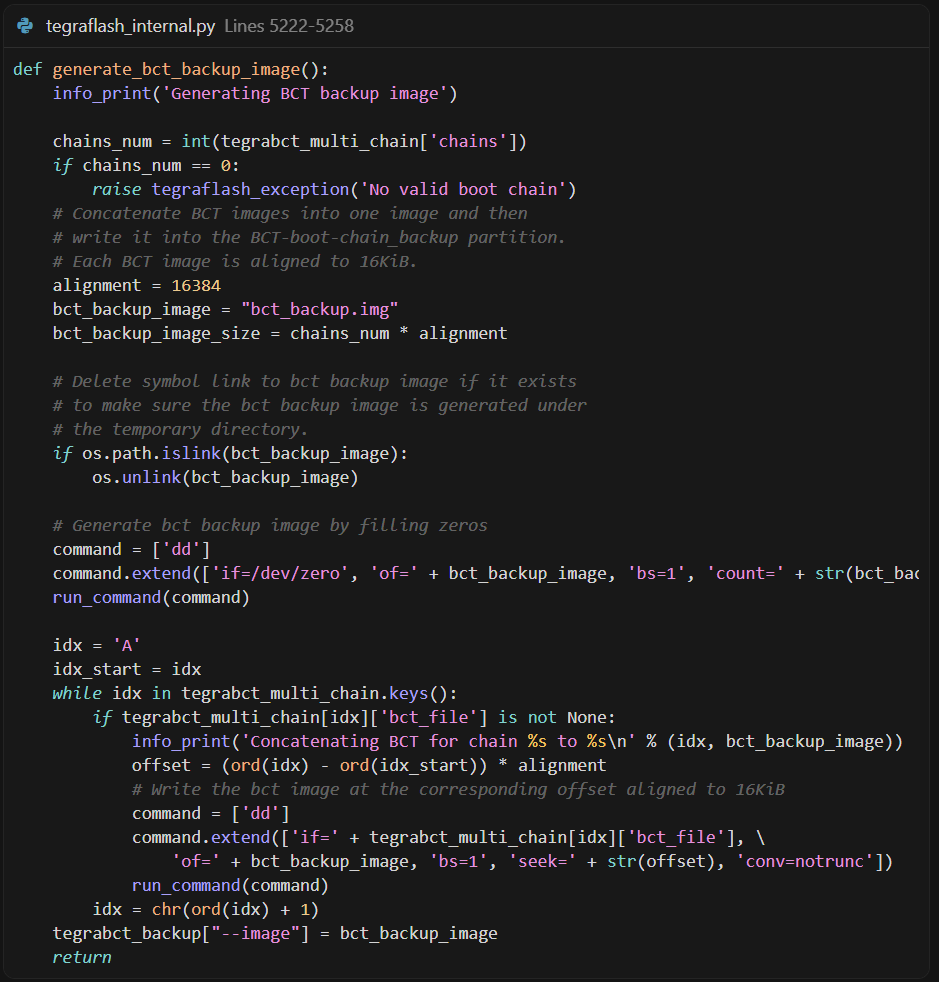
备份机制:
-
将多个启动链的 BCT 合并为一个备份镜像
-
每个 BCT 对齐到 16 KB
-
在固定位置写入备份,用于恢复
        <partition name="reserved_partition" type="data">
            <allocation_policy> sequential </allocation_policy>
            <filesystem_type> basic </filesystem_type>
            <size> 65536 </size>
            <align_boundary> 65536 </align_boundary>
            <file_system_attribute> 0 </file_system_attribute>
            <allocation_attribute> 8 </allocation_attribute>
            <percent_reserved> 0 </percent_reserved>
        </partition>
保留区域,不做赘述
  <partition name="secondary_gpt_backup" type="backup_secondary_gpt">
            <allocation_policy> sequential </allocation_policy>
            <filesystem_type> basic </filesystem_type>
            <start_location> 0x3FC0000 </start_location>
            <size> 65536 </size>
            <align_boundary> 65536 </align_boundary>
            <file_system_attribute> 0 </file_system_attribute>
            <allocation_attribute> 8 </allocation_attribute>
            <percent_reserved> 0 </percent_reserved>
        </partition>
-
分区名称: secondary_gpt_backup
-
分区类型: backup_secondary_gpt
-
起始位置: 0x3FC0000 (固定位置)
-
分区大小: 64 KB (65536 字节)
-
需要签名: 是
Secondary GPT 备份:
存储 Secondary GPT 表的备份
GPT 恢复:Primary GPT 损坏时使用此备份
分区表保护:防止分区表损坏导致无法访问设备
与 secondary_gpt 的区别:
-
secondary_gpt:Secondary GPT 表的实际位置(通常在磁盘末尾)
-
secondary_gpt_backup:Secondary GPT 的额外备份(冗余保护)
        <partition name="B_VER" type="data">
            <allocation_policy> sequential </allocation_policy>
            <filesystem_type> basic </filesystem_type>
            <start_location> 0x3FD0000 </start_location>
            <size> 65536 </size>
            <align_boundary> 65536 </align_boundary>
            <file_system_attribute> 0 </file_system_attribute>
            <partition_attribute> 0 </partition_attribute>
            <allocation_attribute> 8 </allocation_attribute>
            <percent_reserved> 0 </percent_reserved>
            <filename> VERFILE </filename>
        </partition>
-
分区名称: B_VER
-
分区类型: data
-
起始位置: 0x3FD0000 (固定位置)
-
分区大小: 64 KB (65536 字节)
-
固件文件名: VERFILE (与 A_VER 共用)
-
需要签名: 否
B 启动链版本信息分区,存储 B 启动链的版本信息。
版本文件格式(NV4):
版本文件包含:
版本格式标识(NV4)
- BSP 版本信息(分支、主版本、次版本)
- 板级信息(BOARDID、BOARDSKU、FAB)
- 时间戳(生成时间)
- BSP 版本(32 位编码)
- 校验和(CRC32)和文件大小
        <partition name="A_VER" type="data">
            <allocation_policy> sequential </allocation_policy>
            <filesystem_type> basic </filesystem_type>
            <size> 65536 </size>
            <align_boundary> 65536 </align_boundary>
            <file_system_attribute> 0 </file_system_attribute>
            <partition_attribute> 0 </partition_attribute>
            <allocation_attribute> 8 </allocation_attribute>
            <percent_reserved> 0 </percent_reserved>
            <filename> VERFILE </filename>
        </partition>
-
分区名称: A_VER
-
分区类型: data
-
分区大小: 64 KB (65536 字节)
-
起始位置: 动态分配(在 B_VER 之后)
-
固件文件名: VERFILE (与 B_VER 共用)
-
需要签名: 否
A 启动链版本信息分区,存储 A 启动链的版本信息,格式与 B_VER 相同。
A/B 版本管理的意义:
-
区分 A/B 启动链的版本
-
支持 A/B 系统更新和回滚
-
便于系统诊断和问题排查
        <partition name="secondary_gpt" type="secondary_gpt">
            <allocation_policy> sequential </allocation_policy>
            <filesystem_type> basic </filesystem_type>
            <size> 0xFFFFFFFFFFFFFFFF </size>
            <file_system_attribute> 0 </file_system_attribute>
            <allocation_attribute> 8 </allocation_attribute>
            <percent_reserved> 0 </percent_reserved>
        </partition>
-
分区名称: secondary_gpt
-
分区类型: secondary_gpt
-
分区大小: 0xFFFFFFFFFFFFFFFF (动态,通常为磁盘末尾)
-
需要签名: 是
Secondary GPT(GUID Partition Table):
-
GPT 分区表的一部分:Primary GPT 在磁盘开头,Secondary GPT 在末尾
-
备份保护:与 Primary GPT 互为备份,任一损坏可用另一个恢复
-
分区表完整性:保护分区信息,防止分区表损坏
GPT 结构:
磁盘布局:
┌─────────────────────────────────────┐
│ Primary GPT (磁盘开头) │
│ - GPT Header │
│ - Partition Entries │
├─────────────────────────────────────┤
│ 数据分区... │
├─────────────────────────────────────┤
│ Secondary GPT (磁盘末尾) │
│ - Partition Entries (反向) │
│ - GPT Header │
└─────────────────────────────────────┘
    </device>
    <device type="sdmmc_user" instance="3" sector_size="512" num_sectors="INT_NUM_SECTORS" > #EMMC 设备分区信息
        <partition name="master_boot_record" type="protective_master_boot_record">
            <allocation_policy> sequential </allocation_policy>
            <filesystem_type> basic </filesystem_type>
            <size> 512 </size>
            <file_system_attribute> 0 </file_system_attribute>
            <allocation_attribute> 8 </allocation_attribute>
            <percent_reserved> 0 </percent_reserved>
        </partition>
-
分区名称: master_boot_record
-
分区类型: protective_master_boot_record (保护性 MBR)
-
分区大小: 512 字节
-
位置: 磁盘的第一个扇区(LBA 0)
保护性 MBR(Protective MBR):
- 兼容性保护:避免旧工具误识别为 MBR 磁盘并覆盖 GPT
- GPT 保护:标记整个磁盘为单个分区,防止意外修改
- 标准要求:UEFI 规范要求 GPT 磁盘必须有保护性 MBR
      <partition name="primary_gpt" type="primary_gpt">
            <allocation_policy> sequential </allocation_policy>
            <filesystem_type> basic </filesystem_type>
            <size> 19968 </size>
            <file_system_attribute> 0 </file_system_attribute>
            <allocation_attribute> 8 </allocation_attribute>
            <percent_reserved> 0 </percent_reserved>
        </partition>
-
分区名称: primary_gpt
-
分区类型: primary_gpt
-
分区大小: 19968 字节(约 19.5 KB)
-
位置: LBA 1 开始
Primary GPT(主 GPT 表)包含:
GPT Header:分区表的元数据
Partition Entries:所有分区的详细信息(每个分区条目 128 字节)
分区表定义:定义所有分区的名称、大小、位置、类型等
        <partition name="A_kernel" id="2" type="kernel">
            <allocation_policy> sequential </allocation_policy>
            <filesystem_type> basic </filesystem_type>
            <size> 134217728 </size>
            <file_system_attribute> 0 </file_system_attribute>
            <allocation_attribute> 8 </allocation_attribute>
            <percent_reserved> 0 </percent_reserved>
            <filename> LNXFILE </filename>
        </partition>
-
分区名称: A_kernel
-
分区类型: kernel
-
分区大小: 134217728 字节(128 MB)
-
Partition ID: id="2"(在 GPT 中的分区编号)
-
固件文件名: LNXFILE(通常是 boot.img 或 Image)
-
需要签名: 否(根据 l4t_bup_gen.func)
A 启动链的内核分区:
存储 Linux 内核镜像
正常启动时由 UEFI 加载
支持 A/B 启动链切换
        <partition name="A_kernel-dtb" type="kernel_dtb">
            <allocation_policy> sequential </allocation_policy>
            <filesystem_type> basic </filesystem_type>
            <size> 786432 </size>
            <file_system_attribute> 0 </file_system_attribute>
            <allocation_attribute> 8 </allocation_attribute>
            <percent_reserved> 0 </percent_reserved>
            <filename> DTB_FILE </filename>
        </partition>
-
分区名称: A_kernel-dtb
-
分区类型: kernel_dtb
-
分区大小: 786432 字节(768 KB)
-
固件文件名: DTB_FILE(设备树二进制文件)
-
需要签名: 否
-
板子特定: 是(BOARD_SPECIFIC = 1)
A 启动链的内核设备树分区,包含板级硬件配置信息。
        <partition name="A_reserved_on_user" type="data">
            <allocation_policy> sequential </allocation_policy>
            <filesystem_type> basic </filesystem_type>
            <size> 33161216 </size>
            <file_system_attribute> 0 </file_system_attribute>
            <allocation_attribute> 8 </allocation_attribute>
            <percent_reserved> 0 </percent_reserved>
        </partition>
保留区域,不做赘述。
 <partition name="B_kernel" type="kernel">
            <allocation_policy> sequential </allocation_policy>
            <filesystem_type> basic </filesystem_type>
            <size> 134217728 </size>
            <file_system_attribute> 0 </file_system_attribute>
            <allocation_attribute> 8 </allocation_attribute>
            <percent_reserved> 0 </percent_reserved>
            <filename> LNXFILE </filename>
        </partition>
        <partition name="B_kernel-dtb" type="kernel_dtb">
            <allocation_policy> sequential </allocation_policy>
            <filesystem_type> basic </filesystem_type>
            <size> 786432 </size>
            <file_system_attribute> 0 </file_system_attribute>
            <allocation_attribute> 8 </allocation_attribute>
            <percent_reserved> 0 </percent_reserved>
            <filename> DTB_FILE </filename>
        </partition>
        <partition name="B_reserved_on_user" type="data">
            <allocation_policy> sequential </allocation_policy>
            <filesystem_type> basic </filesystem_type>
            <size> 33161216 </size>
            <file_system_attribute> 0 </file_system_attribute>
            <allocation_attribute> 8 </allocation_attribute>
            <percent_reserved> 0 </percent_reserved>
        </partition>
同上A区,不做赘述。
   <partition name="RECNAME" type="kernel">
            <allocation_policy> sequential </allocation_policy>
            <filesystem_type> basic </filesystem_type>
            <size> RECSIZE </size>
            <file_system_attribute> 0 </file_system_attribute>
            <allocation_attribute> 8 </allocation_attribute>
            <percent_reserved> 0 </percent_reserved>
            <filename> RECFILE </filename>
        </partition>
-
分区名称: RECNAME(实际名称:recovery)
-
分区类型: kernel
-
分区大小: RECSIZE(动态,通常为 64-128 MB)
-
固件文件名: RECFILE(通常是 recovery.img)
恢复内核分区:
-
存储恢复模式内核镜像(包含 initramfs)
-
系统修复:在正常系统损坏时启动
-
OTA 更新:用于执行系统更新
-
故障诊断:提供诊断和修复工具
恢复镜像生成:
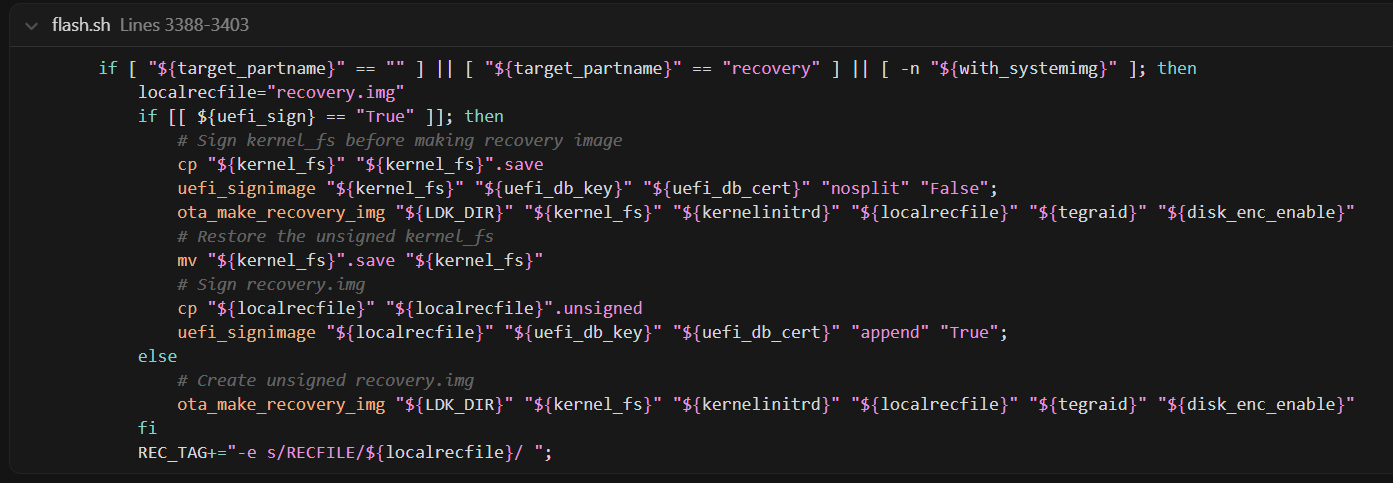
恢复镜像包含:
-
Linux 内核
-
Initramfs(包含恢复工具)
-
命令行参数
        <partition name="RECDTB-NAME" type="kernel_dtb">
            <allocation_policy> sequential </allocation_policy>
            <filesystem_type> basic </filesystem_type>
            <size> 524288 </size>
            <file_system_attribute> 0 </file_system_attribute>
            <allocation_attribute> 8 </allocation_attribute>
            <percent_reserved> 0 </percent_reserved>
            <filename> RECDTB-FILE </filename>
        </partition>
-
分区名称: RECDTB-NAME(实际名称:recovery-dtb)
-
分区类型: kernel_dtb
-
分区大小: 524288 字节(512 KB)
-
固件文件名: RECDTB-FILE(恢复模式的设备树文件)
恢复模式的设备树分区,用于恢复内核的硬件配置。
        <partition name="esp" type="data">
            <allocation_policy> sequential </allocation_policy>
            <filesystem_type> basic </filesystem_type>
            <size> 67108864 </size>
            <file_system_attribute> 0 </file_system_attribute>
            <allocation_attribute> 0x8 </allocation_attribute>
            <percent_reserved> 0 </percent_reserved>
            <filename> ESP_FILE </filename>
            <partition_type_guid> C12A7328-F81F-11D2-BA4B-00A0C93EC93B </partition_type_guid>
            <description> **Required.** EFI system partition with L4T Launcher. </description>
        </partition>
-
分区名称: esp
-
分区类型: data(但具有 EFI 系统分区 GUID)
-
分区大小: 67108864 字节(64 MB)
-
Partition Type GUID: C12A7328-F81F-11D2-BA4B-00A0C93EC93B(EFI System Partition)
-
文件系统: FAT32
ESP(EFI System Partition)是 UEFI 标准分区,包含:
UEFI 启动文件:
-
EFI/BOOT/BOOTAA64.efi(L4T Launcher)
-
其他 UEFI 应用程序
UEFI 变量存储(部分系统)
Capsule Update 文件:固件更新文件
ESP 镜像创建:
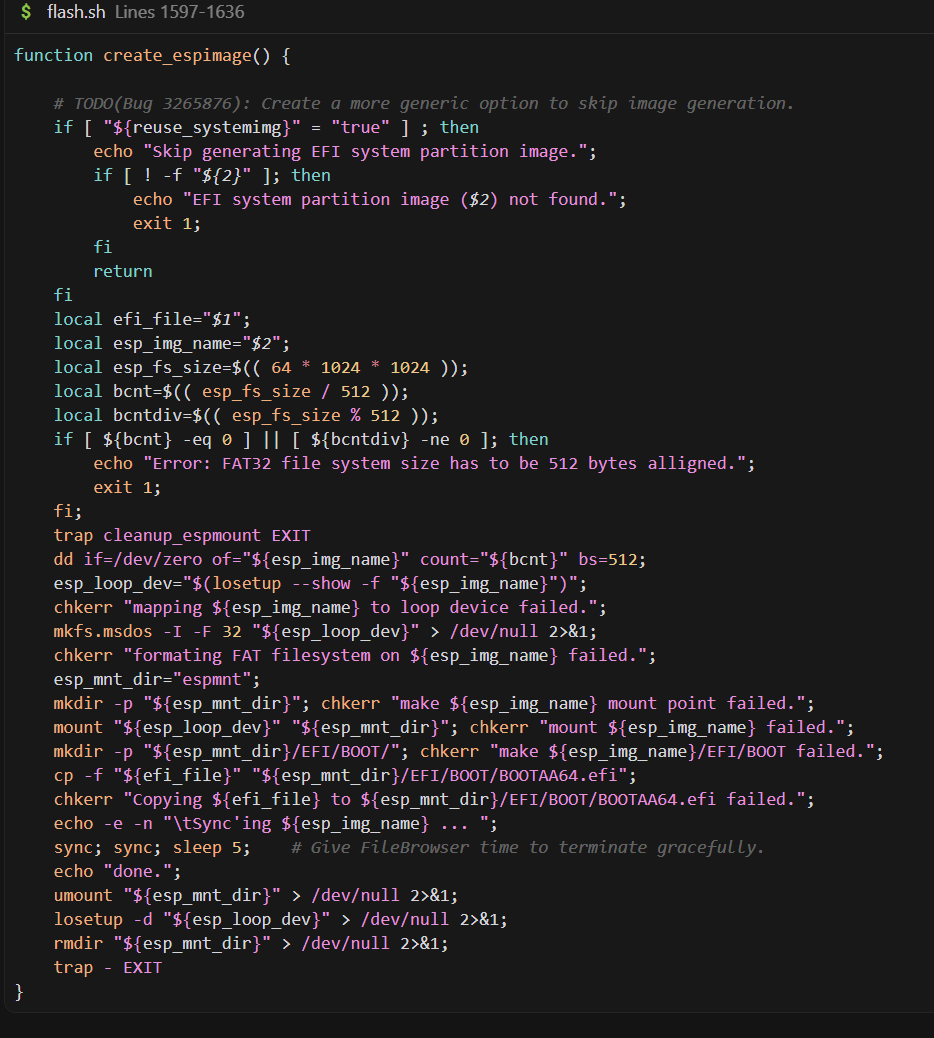
        <partition name="RECNAME_alt" type="kernel">
            <allocation_policy> sequential </allocation_policy>
            <filesystem_type> basic </filesystem_type>
            <size> RECSIZE </size>
            <file_system_attribute> 0 </file_system_attribute>
            <allocation_attribute> 8 </allocation_attribute>
            <percent_reserved> 0 </percent_reserved>
        </partition>

        <partition name="RECDTB-NAME_alt" type="kernel_dtb">
            <allocation_policy> sequential </allocation_policy>
            <filesystem_type> basic </filesystem_type>
            <size> 524288 </size>
            <file_system_attribute> 0 </file_system_attribute>
            <allocation_attribute> 8 </allocation_attribute>
            <percent_reserved> 0 </percent_reserved>
        </partition>
        <partition name="esp_alt" type="data">
            <allocation_policy> sequential </allocation_policy>
            <filesystem_type> basic </filesystem_type>
            <size> 67108864 </size>
            <file_system_attribute> 0 </file_system_attribute>
            <allocation_attribute> 0x8 </allocation_attribute>
            <percent_reserved> 0 </percent_reserved>
            <description> **Required.** EFI system partition for fail-safe ESP update. </description>
        </partition>
分区 12-14: RECNAME_alt、RECDTB-NAME_alt、esp_alt
这三个是备用分区,用于安全的更新机制:
-
RECNAME_alt:备用恢复内核(与 recovery 相同大小)
-
RECDTB-NAME_alt:备用恢复设备树(512 KB)
-
esp_alt:备用 ESP(64 MB)
Fail-Safe 更新机制:
- 更新时先写入备用分区
- 验证成功后切换
- 失败时回滚,保证系统可恢复
        <partition name="UDA" type="data">
            <allocation_policy> sequential </allocation_policy>
            <filesystem_type> basic </filesystem_type>
            <size> 419430400 </size>
            <file_system_attribute> 0 </file_system_attribute>
            <allocation_attribute> 8 </allocation_attribute>
            <percent_reserved> 0 </percent_reserved>
            <align_boundary> 16384 </align_boundary>
           <description> **Required.** This partition may be mounted and used to store user
              data. </description>
        </partition>
-
分区名称: UDA (User Data Area)
-
分区类型: data
-
分区大小: 419430400 字节(400 MB)
-
对齐边界: 16384 字节(16 KB)
-
作用: 用户数据存储区域
用户数据区域:
- 用户数据存储:应用程序数据、配置文件、日志等
- 可挂载文件系统:通常格式化为 ext4 或 FAT32
- 独立于系统分区:系统更新不影响用户数据
- 持久化存储:用户数据和设置
        <partition name="reserved" type="data">
            <allocation_policy> sequential </allocation_policy>
            <filesystem_type> basic </filesystem_type>
            <size> 502792192 </size> <!-- Recalculate the size if RECSIZE changed -->
            <file_system_attribute> 0 </file_system_attribute>
            <allocation_attribute> 8 </allocation_attribute>
            <percent_reserved> 0 </percent_reserved>
            <description> **Required.** Reserve space in case there is any partition change
              required in the future, for example, adding new partitions or increasing size
              of some partitions. </description>
        </partition>
保留区域,不做赘述。
        <partition name="APP" id="1" type="data">
            <allocation_policy> sequential </allocation_policy>
            <filesystem_type> basic </filesystem_type>
            <size> APPSIZE </size>
            <file_system_attribute> 0 </file_system_attribute>
            <allocation_attribute> 0x808 </allocation_attribute>
            <align_boundary> 16384 </align_boundary>
            <percent_reserved> 0 </percent_reserved>
            <unique_guid> APPUUID </unique_guid>
            <filename> APPFILE </filename>
            <description> **Required.** Contains the rootfs. This partition must be assigned
              the "1" for id as it is physically put to the end of the device, so that it
              can be accessed as the fixed known special device `/dev/mmcblk0p1`. </description>
        </partition>
-
分区名称: APP
-
分区类型: data
-
Partition ID: id="1"(固定为 1)
-
分区大小: APPSIZE(动态,通常为数 GB 到数十 GB)
-
唯一 GUID: APPUUID(每个系统唯一)
-
固件文件名: APPFILE(通常是 system.img 或 system_boot.img)
-
特殊设备: /dev/mmcblk0p1(固定设备节点)
根文件系统(RootFS)分区:
- 包含完整的 Linux 根文件系统
- 操作系统文件:系统二进制、库、配置文件等
- 固定设备节点:/dev/mmcblk0p1(便于访问和挂载)
- 系统更新目标:OTA 更新的主要分区
重要说明:虽然 Partition ID 是 1,但该分区物理位置在磁盘末尾,这样可以确保 /dev/mmcblk0p1 始终指向根文件系统,无论其他分区如何变化。
        <partition name="secondary_gpt" type="secondary_gpt">
            <allocation_policy> sequential </allocation_policy>
            <filesystem_type> basic </filesystem_type>
            <size> 0xFFFFFFFFFFFFFFFF </size>
            <file_system_attribute> 0 </file_system_attribute>
            <allocation_attribute> 8 </allocation_attribute>
            <percent_reserved> 0 </percent_reserved>
        </partition>
-
分区名称: secondary_gpt
-
分区类型: secondary_gpt
-
分区大小: 0xFFFFFFFFFFFFFFFF(动态,位于磁盘末尾)
-
位置: 磁盘的最后一个扇区区域
Secondary GPT(备份 GPT 表):
- Primary GPT 的备份,位于磁盘末尾
- 与 Primary GPT 互为备份,提高可靠性
- GPT 恢复:Primary GPT 损坏时可从此恢复
完整分区特性总结表
QSPI-FLASH分区
| 序号 | 分区名称 | 类型 | 大小 (字节) | 大小 (KB/MB) | 对齐边界 | OEM签名 | 固件文件名变量 | 实际固件文件 | 主要功能 |
|---|---|---|---|---|---|---|---|---|---|
| 公共分区 | |||||||||
| 1 | BCT | boot_config_table | 1,048,576 | 1 MB | - | ❌ | (动态生成) | BCT二进制文件 | BootROM配置表,包含分区布局和启动链信息 |
| A 启动链 (A Boot Chain) | |||||||||
| 2 | A_mb1 | mb1_bootloader | 524,288 | 512 KB | 256 KB | ❌ | MB1FILE | bootloader/mb1_t234_prod.bin | 第一级引导程序,初始化关键硬件 |
| 3 | A_psc_bl1 | psc_bl1 | 262,144 | 256 KB | 64 KB | ✅ | PSCBL1FILE | bootloader/psc_bl1_t234_prod.bin | 平台安全控制器第一级引导程序 |
| 4 | A_MB1_BCT | mb1_boot_config_table | 131,072 | 128 KB | 64 KB | ❌ | (动态生成) | MB1 BCT | MB1专用配置表 |
| 5 | A_MEM_BCT | mem_boot_config_table | 262,144 | 256 KB | 64 KB | ❌ | (动态生成) | MEM BCT | 内存(DDR/LPDDR)配置表 |
| 6 | A_tsec-fw | tsec_fw | 1,048,576 | 1 MB | 64 KB | ✅ | TSECFW | bootloader/tsec_t234.bin | 可信安全引擎固件(安全启动、加密) |
| 7 | A_nvdec | nvdec | 1,048,576 | 1 MB | 64 KB | ✅ | NVHOSTNVDEC | bootloader/nvdec_t234_prod.fw | NVIDIA视频解码器固件 |
| 8 | A_mb2 | mb2_bootloader | 524,288 | 512 KB | 64 KB | ✅ | MB2BLFILE | bootloader/mb2_t234.bin | 第二级引导程序,加载CPU引导程序 |
| 9 | A_xusb-fw | xusb_fw | 262,144 | 256 KB | 64 KB | ✅ | XUSB_FW | bootloader/xusb_t234_prod.bin | 扩展USB控制器固件 |
| 10 | A_bpmp-fw | bpmp_fw | 1,572,864 | 1.5 MB | 64 KB | ✅ | BPFFILE | bootloader/bpmp_t234-TE990M-A1_prod.bin | 引导和电源管理处理器固件 |
| 11 | A_bpmp-fw-dtb | bpmp_fw_dtb | 4,194,304 | 4 MB | 64 KB | ✅ | BPFDTB_FILE | BPMP设备树 | BPMP设备树二进制文件 |
| 12 | A_psc-fw | psc_fw | 786,432 | 768 KB | 64 KB | ✅ | PSCFW | bootloader/pscfw_t234_prod.bin | 平台安全控制器固件 |
| 13 | A_mts-mce | mts_mce | 524,288 | 512 KB | 64 KB | ✅ | MCE_IMAGE | bootloader/mce_flash_o10_cr_prod.bin | 内存训练和错误擦除微码引擎 |
| 14 | A_sc7 | WB0 | 196,608 | 192 KB | 64 KB | ✅ | WB0FILE | bootloader/sc7_t234_prod.bin | SC7系统挂起状态固件 |
| 15 | A_pscrf | psc_rf | 196,608 | 192 KB | 64 KB | ✅ | PSCRF_IMAGE | bootloader/psc_rf_t234_prod.bin | PSC恢复固件 |
| 16 | A_mb2rf | mb2rf | 131,072 | 128 KB | 64 KB | ✅ | MB2RF_IMAGE | bootloader/mb2rf_t234.bin | MB2恢复固件 |
| 17 | A_cpu-bootloader | bootloader_stage2 | 3,670,016 | 3.5 MB | 64 KB | ✅ | TBCDTB-FILE | uefi_jetson_with_dtb.bin | CPU引导程序(UEFI),LZ4压缩 |
| 18 | A_secure-os | tos | 4,194,304 | 4 MB | 64 KB | ✅ | TOSFILE | bootloader/tos_t234.img | 可信操作系统(TEE) |
| 19 | A_smm-fw | data | 2,097,152 | 2 MB | 64 KB | ✅ | - | (无文件名) | 系统管理模式固件 |
| 20 | A_eks | eks | 262,144 | 256 KB | 64 KB | ✅ | EKSFILE | bootloader/eks_t234.img | 加密密钥存储 |
| 21 | A_dce-fw | dce_fw | 5,242,880 | 5 MB | 64 KB | ✅ | DCE | bootloader/display-t234-dce.bin | 显示控制器引擎固件,LZ4压缩 |
| 22 | A_spe-fw | spe_fw | 589,824 | 576 KB | 64 KB | ✅ | SPEFILE | bootloader/spe_t234.bin | 安全处理引擎固件 |
| 23 | A_rce-fw | rce_fw | 1,048,576 | 1 MB | 64 KB | ✅ | CAMERAFW | bootloader/camera-rtcpu-t234-rce.img | 实时相机引擎固件 |
| 24 | A_adsp-fw | ape_fw | 2,097,152 | 2 MB | 64 KB | ✅ | adsp-fw.bin | bootloader/adsp-fw.bin | 音频数字信号处理器固件 |
| 25 | A_pva-fw | pva_fw | 262,144 | 256 KB | 64 KB | ✅ | PVA_FILE | bootloader/nvpva_020.fw | 可编程视觉加速器固件,LZ4压缩 |
| 26 | A_reserved_on_boot | data | 1,114,112 | 1.09 MB | 64 KB | ❌ | - | (保留空间) | 启动时保留分区,用于未来扩展 |
| B 启动链 (B Boot Chain) | |||||||||
| 27-50 | B_* | (同上) | (同上) | (同上) | (同上) | (同上) | (同上) | (同上) | B启动链分区,与A启动链完全对应 |
| 系统分区 | |||||||||
| 51 | uefi_variables | data | 262,144 | 256 KB | 64 KB | ❌ | - | (无文件名) | UEFI变量存储(NVRAM),存储Secure Boot密钥等 |
| 52 | uefi_ftw | data | 524,288 | 512 KB | 64 KB | ❌ | - | (无文件名) | UEFI固件表写入分区,确保变量更新的原子性 |
| 53 | reserved | data | 196,608 | 192 KB | 64 KB | ❌ | - | (保留空间) | 保留分区 |
| 54 | worm | data | 196,608 | 192 KB | 64 KB | ❌ | - | (无文件名) | 写入一次读取多次分区,存储不可变数据 |
| 55 | BCT-boot-chain_backup | data | 65,536 | 64 KB | 64 KB | ❌ | (动态生成) | BCT备份 | A/B启动链的BCT备份 |
| 56 | reserved_partition | data | 65,536 | 64 KB | 64 KB | ❌ | - | (保留空间) | 额外保留分区 |
| 57 | secondary_gpt_backup | backup_secondary_gpt | 65,536 | 64 KB | 64 KB | ❌ | (动态生成) | GPT备份 | 辅助GPT表备份 |
| 58 | B_VER | data | 65,536 | 64 KB | 64 KB | ❌ | VERFILE | qspi_bootblob_ver.txt | B启动链版本信息 |
| 59 | A_VER | data | 65,536 | 64 KB | 64 KB | ❌ | VERFILE | qspi_bootblob_ver.txt | A启动链版本信息 |
| 60 | secondary_gpt | secondary_gpt | 动态 | - | - | ❌ | (动态生成) | GPT表 | 辅助GUID分区表,位于Flash末尾 |
EMMC设备分区
| 序号 | 分区名称 | 类型 | 大小 (字节) | 大小 (KB/MB/GB) | 分区ID | 对齐边界 | 文件名变量 | 实际文件名/内容 | 设备节点 | 主要功能 |
|---|---|---|---|---|---|---|---|---|---|---|
| 分区表结构 | ||||||||||
| 1 | master_boot_record | protective_master_boot_record | 512 | 512 B | - | - | - | MBR | - | 主引导记录(保护性MBR),用于GPT兼容性 |
| 2 | primary_gpt | primary_gpt | 19,968 | 19.5 KB | - | - | (动态生成) | GPT表 | - | 主GPT分区表,包含分区元数据 |
| A 启动链 (A Boot Chain) | ||||||||||
| 3 | A_kernel | kernel | 134,217,728 | 128 MB | id="2" | - | LNXFILE | boot.img | mmcblk0p2 | A启动链内核镜像(含initrd) |
| 4 | A_kernel-dtb | kernel_dtb | 786,432 | 768 KB | - | - | DTB_FILE | DTB文件 | - | A启动链设备树二进制文件 |
| 5 | A_reserved_on_user | data | 33,161,216 | 31.64 MB | - | - | - | (保留空间) | - | A启动链保留分区,用于未来扩展 |
| B 启动链 (B Boot Chain) | ||||||||||
| 6 | B_kernel | kernel | 134,217,728 | 128 MB | - | - | LNXFILE | boot.img | - | B启动链内核镜像(含initrd) |
| 7 | B_kernel-dtb | kernel_dtb | 786,432 | 768 KB | - | - | DTB_FILE | DTB文件 | - | B启动链设备树二进制文件 |
| 8 | B_reserved_on_user | data | 33,161,216 | 31.64 MB | - | - | - | (保留空间) | - | B启动链保留分区,用于未来扩展 |
| 恢复分区 (Recovery) | ||||||||||
| 9 | recovery | kernel | 83,886,080 | 80 MB | - | - | RECFILE | recovery.img | - | 恢复模式内核镜像 |
| 10 | recovery-dtb | kernel_dtb | 524,288 | 512 KB | - | - | RECDTB-FILE | 恢复DTB | - | 恢复模式设备树二进制文件 |
| EFI 系统分区 (ESP) | ||||||||||
| 11 | esp | data | 67,108,864 | 64 MB | - | - | ESP_FILE | esp.img | - | EFI系统分区,包含L4T启动器(BOOTAA64.efi),GPT GUID: C12A7328-F81F-11D2-BA4B-00A0C93EC93B |
| 备用恢复分区 (Alternate Recovery) | ||||||||||
| 12 | recovery_alt | kernel | 83,886,080 | 80 MB | - | - | - | (备用恢复镜像) | - | 备用恢复分区,用于故障安全更新 |
| 13 | recovery-dtb_alt | kernel_dtb | 524,288 | 512 KB | - | - | - | (备用恢复DTB) | - | 备用恢复DTB分区 |
| 14 | esp_alt | data | 67,108,864 | 64 MB | - | - | - | (备用ESP镜像) | - | 备用ESP分区,用于故障安全ESP更新 |
| 用户数据区 (User Data Area) | ||||||||||
| 15 | UDA | data | 419,430,400 | 400 MB | - | 16 KB | - | (用户数据) | - | 用户数据分区,可挂载用于存储用户数据 |
| 16 | reserved | data | 502,792,192 | ~479.6 MB | - | - | - | (保留空间) | - | 保留分区,用于未来分区变更(如新增分区或调整大小) |
| 根文件系统 (Root Filesystem) | ||||||||||
| 17 | APP | data | APPSIZE (动态) | 默认: 55 GiB ROOTFS_AB=1: 27.5 GiB |
id="1" | 16 KB | APPFILE | system.img | mmcblk0p1 | 根文件系统分区,必须固定为id="1",位于设备末尾,作为/dev/mmcblk0p1访问 |
| 分区表结束 | ||||||||||
| 18 | secondary_gpt | secondary_gpt | 动态 | - | - | - | (动态生成) | GPT表备份 | - | 辅助GUID分区表,位于设备末尾,用于备份和恢复 |